Loading home
Loading home
Skip to content
Blog
  1. Blog
  2. /
  3. Workflow guides
  4. /
  5. Household Free vs Pro on lattuce.app — which plan fits your lab?

April 10, 2027 · Workflow guides

Household Free vs Pro on lattuce.app — which plan fits your lab?

Household Free vs Pro on Lattuce — shared library, papers, Learner, and AI wallets. Check /pricing for live limits.

  • guide
  • pricing
  • household
  • billing
  • seo
LanguageEnglishBahasa Melayu

Lattuce pricing is household-scoped on lattuce.app: one shared plan covers library sources, papers, Learner items, and AI wallets for everyone you invite. The public pricing page is the source of truth for feature rows. This guide helps a lab admin decide Free vs Pro without chasing numbers that change.
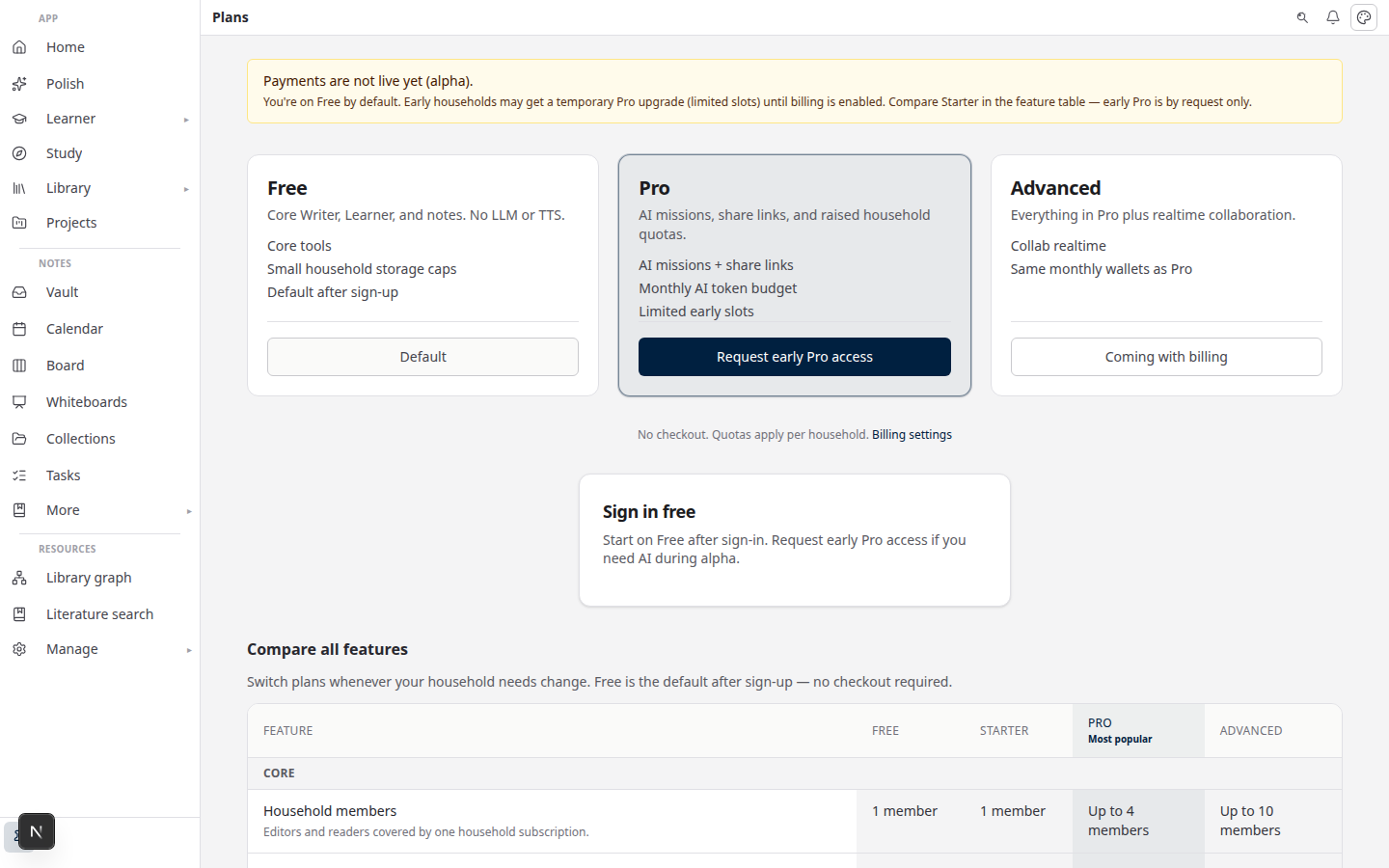
Lattuce pricing on lattuce.app

Who this is for

You are…Read this when…
Household adminYou pick a plan before inviting students or family
Graduate authorA create action blocked because the household hit a cap
PI or lab leadYou want a shared library and more than one paper in flight
Alpha testerCheckout is off and you need to know how complimentary Pro works

For how household billing works — meters, fail-closed gates, and what is still deferred — start with Household billing and /pricing. This post is the which plan decision.

Before you start

You needNotes
A Lattuce accountSign in at lattuce.app
A sense of household sizeQuotas are shared — one member’s uploads count for everyone
The /pricing page openCanonical Free vs Pro rows (and any advanced household rows)
Optional AI keysBring your own provider keys — BYOK guide
Optional week-one checklistHousehold admin's first week

Do not treat blog copy as the live limit sheet. If a row on /pricing disagrees with this guide, trust /pricing.

When Free is enough

Stay on Free when the household is still small and the work is bounded:

  • Library — a personal reading pile or a starter set of PDFs, not a lab-wide archive
  • Papers — one manuscript (or a tight pair) in progress
  • Learner — a light set of content items for exam prep or vocabulary
  • AI — occasional compose, digest, or spoken review on the included LLM and TTS wallet

Free is also enough if you mainly write and cite by hand. Writer, Library, and Notes still run without a large AI wallet. Add BYOK if you want your own model provider — that does not enlarge library or paper caps.

Path A — stay Free

  1. Open /pricing and scan the Free column.
  2. In Settings → Billing (or Account → Plan), compare usage meters to those limits.
  3. Keep working if you can still create sources, papers, and Learner items.

When you hit a cap, Lattuce blocks the create instead of letting the household silently overage. That is the signal to read the Pro column — not a bug.

When to upgrade to Pro

Upgrade to Pro when Free starts shaping the research, not just the bill:

  • Library — the shared pile is growing (many sources, several people uploading)
  • Papers — more than a couple of manuscripts need to stay active
  • Learner — heavier course or reading imports, not a handful of items
  • AI — the household regularly uses compose, missions, or TTS and needs a larger included wallet

Pro is the usual fit for a lab household: a supervisor plus students who share one library and take turns on papers. Check /pricing for current limits — this post does not freeze counts that the product can change.

Path B — move to Pro

  1. Confirm the block or the forecast on Settings usage meters.
  2. Re-read the Pro feature rows on /pricing.
  3. During alpha, request complimentary Pro via contact if checkout is off (see below).
  4. When payments are live, upgrade from /pricing or the in-app CTA.

Some AI surfaces (for example research missions, when billing is enabled) stay plan-gated even if you supply your own keys.

OutcomeFreePro
Library sourcesFits a small or personal libraryFits a shared lab reading pile
PapersEnough for a focused manuscript loadMore concurrent papers
Learner contentLight item setHeavier imports
LLM / TTS walletsModest included capacityLarger household wallet
Exact capsSee /pricingSee /pricing

BYOK vs plan

Bring Your Own Key (BYOK) and the household plan answer different questions:

MechanismWhat it decides
Plan quotasHow many sources, papers, and Learner items the household can hold
AI walletsHow much included LLM and TTS capacity the household gets this period
BYOKWhich provider bills the model — BYOK guide

BYOK is not a second subscription and not a bypass. Your own keys can change who pays the model. They do not raise library or paper limits, and they do not unlock Pro-only gates.

Settings show usage as tokens and characters, not dollar amounts. For current included wallets, see /pricing rather than any figure copied into a blog post.

AI quota SKUs as separate add-on products are deferred. For alpha, wallets plus BYOK cover that need.

Alpha checkout notes

Lattuce at lattuce.app is in alpha. That changes how you get Pro, not what Free vs Pro means.

What you will seeWhat to do
Banner: Payments are not live yetSelf-serve checkout may be off — you can still compare tiers on /pricing
Complimentary ProEarly households may receive a manual Pro grant (capped). Settings may say complimentary until paid plans go live
Request pathUse contact or “Request early Pro access” from the pricing banner — do not expect a card form yet
EntitlementsPlan gates and usage meters still apply so you can learn the real caps

A global SaaS product domain beyond household billing on lattuce.app is deferred. You are choosing a household plan, not an enterprise seat contract.

When checkout turns on, upgrade from /pricing or the in-app upgrade prompt. Do not paste payment secrets or provider keys into notes or chat.

Bottom line

Stay on Free while the household is a small library and one manuscript. Upgrade to Pro when shared uploads, extra papers, or AI wallets start blocking work. Confirm live caps on /pricing — this post does not freeze numbers. BYOK changes who pays the model, not how many sources you can keep.

Related reading

  • Pricing — live Free vs Pro feature rows
  • Household billing and /pricing — how shared quotas and meters work
  • BYOK on Lattuce — your own provider keys
  • Household admin's first week — invites and a first paper path
  • Lattuce at lattuce.app is in alpha — what the alpha label means

Bahasa Melayu: Household Free vs Pro di lattuce.app — pelan mana sesuai untuk makmal anda?

PreviousHow to export a cited thesis chapter to Word from LattuceNextTry Lattuce Writer demo walkthrough — cited drafting without an account

Workflow guides

  1. 1. Where you can use Lattuce today — cloud, Windows, and Android
  2. 2. Lattuce at lattuce.app is in alpha — what that means for you
  3. 3. Try Lattuce without signing up — interactive demos at lattuce.app/try
  4. 4. Leaving Lattuce cleanly — try first, delete when you need to
  5. 5. Literature review with Lattuce — from search to a cited Word file
  6. 6. Study vs Learner in Lattuce — exam prep or language learning?
  7. 7. Thesis format check in Lattuce — upload Word, fix layout, verify before you submit
  8. 8. BYOK on Lattuce — bring your own AI keys
  9. 9. Sources to DOCX in Lattuce — end-to-end manuscript workflow
  10. 10. BYOS on Lattuce — bring your own storage
  11. 11. Research missions in Lattuce — structured synthesis with evidence export
  12. 12. Use Lattuce from Cursor and Claude — your research in your IDE
  13. 13. Source Digest in Lattuce Study — audio, tables, mind maps, and flashcards
  14. 14. Workspace Ask for a household lab — grounded Q&A over your vault
  15. 15. Query canvas in Lattuce — live boards from your notes vault
  16. 16. Zotero to BibTeX in Lattuce — import, cite, and hand off bibliographies
  17. 17. Notes view layouts in Lattuce — Live, Read, and a sticky outline
  18. 18. Household admin's first week with Lattuce — checks and day-two tasks
  19. 19. Notes catalog layouts in Lattuce — Table, Board, Timeline, and saved views for your vault
  20. 20. Household billing and /pricing on Lattuce — transparent tiers for shared accounts
  21. 21. Version history in Lattuce — compare checkpoints, restore with confidence, and a three-tier workspace
  22. 22. Why Lattuce is not trying to replace Notion
  23. 23. Citation style preview in Lattuce — compare APA, MLA, Chicago, and more before you export
  24. 24. Research stack in 2026 — where Lattuce on lattuce.app sits
  25. 25. Supported citation formats in Lattuce — APA, Vancouver, Nature, and 27 more
  26. 26. Data residency for university labs in Malaysia
  27. 27. Why section approval beats realtime co-edit for academic papers
  28. 28. Research signals and feeds in Lattuce — headlines on home, sources in your library
  29. 29. Open catalogs Lattuce connects to — scholarly search, OA links, and books
  30. 30. How to export a cited thesis chapter to Word from Lattuce
  31. You are here31. Household Free vs Pro on lattuce.app — which plan fits your lab?
  32. 32. Try Lattuce Writer demo walkthrough — cited drafting without an account
  33. 33. Notes Live vs Read vs Split — when to use which in Lattuce
  34. 34. Citation styles for Malaysian universities in Lattuce Writer
  35. 35. From PDF highlight to cited paragraph in Lattuce
  36. 36. Leaving Notion pages in place — handoff checklist for Lattuce research
  37. 37. Alpha feedback — how to report useful bugs on lattuce.app

On this page

  1. Who this is for
  2. Before you start
  3. When Free is enough
  4. When to upgrade to Pro
  5. BYOK vs plan
  6. Alpha checkout notes
  7. Bottom line
  8. Related reading

Explore Lattuce

Start writing, compare tools, or browse tutorials for your research stack.

Try LattuceTutorialsPlans

Subscribe to Workflow guides: RSS · Atom

← All posts
TermsPrivacyCookiesRefundsFAQContact[email protected]

© Lattuce

Skip to content
Blog
  1. Blog
  2. /
  3. Workflow guides
  4. /
  5. Household Free vs Pro on lattuce.app — which plan fits your lab?

April 10, 2027 · Workflow guides

Household Free vs Pro on lattuce.app — which plan fits your lab?

Household Free vs Pro on Lattuce — shared library, papers, Learner, and AI wallets. Check /pricing for live limits.

  • guide
  • pricing
  • household
  • billing
  • seo
LanguageEnglishBahasa Melayu

Lattuce pricing is household-scoped on lattuce.app: one shared plan covers library sources, papers, Learner items, and AI wallets for everyone you invite. The public pricing page is the source of truth for feature rows. This guide helps a lab admin decide Free vs Pro without chasing numbers that change.

Lattuce pricing on lattuce.app

Who this is for

You are…Read this when…
Household adminYou pick a plan before inviting students or family
Graduate authorA create action blocked because the household hit a cap
PI or lab leadYou want a shared library and more than one paper in flight
Alpha testerCheckout is off and you need to know how complimentary Pro works

For how household billing works — meters, fail-closed gates, and what is still deferred — start with Household billing and /pricing. This post is the which plan decision.

Before you start

You needNotes
A Lattuce accountSign in at lattuce.app
A sense of household sizeQuotas are shared — one member’s uploads count for everyone
The /pricing page openCanonical Free vs Pro rows (and any advanced household rows)
Optional AI keysBring your own provider keys — BYOK guide
Optional week-one checklistHousehold admin's first week

Do not treat blog copy as the live limit sheet. If a row on /pricing disagrees with this guide, trust /pricing.

When Free is enough

Stay on Free when the household is still small and the work is bounded:

  • Library — a personal reading pile or a starter set of PDFs, not a lab-wide archive
  • Papers — one manuscript (or a tight pair) in progress
  • Learner — a light set of content items for exam prep or vocabulary
  • AI — occasional compose, digest, or spoken review on the included LLM and TTS wallet

Free is also enough if you mainly write and cite by hand. Writer, Library, and Notes still run without a large AI wallet. Add BYOK if you want your own model provider — that does not enlarge library or paper caps.

Path A — stay Free

  1. Open /pricing and scan the Free column.
  2. In Settings → Billing (or Account → Plan), compare usage meters to those limits.
  3. Keep working if you can still create sources, papers, and Learner items.

When you hit a cap, Lattuce blocks the create instead of letting the household silently overage. That is the signal to read the Pro column — not a bug.

When to upgrade to Pro

Upgrade to Pro when Free starts shaping the research, not just the bill:

  • Library — the shared pile is growing (many sources, several people uploading)
  • Papers — more than a couple of manuscripts need to stay active
  • Learner — heavier course or reading imports, not a handful of items
  • AI — the household regularly uses compose, missions, or TTS and needs a larger included wallet

Pro is the usual fit for a lab household: a supervisor plus students who share one library and take turns on papers. Check /pricing for current limits — this post does not freeze counts that the product can change.

Path B — move to Pro

  1. Confirm the block or the forecast on Settings usage meters.
  2. Re-read the Pro feature rows on /pricing.
  3. During alpha, request complimentary Pro via contact if checkout is off (see below).
  4. When payments are live, upgrade from /pricing or the in-app CTA.

Some AI surfaces (for example research missions, when billing is enabled) stay plan-gated even if you supply your own keys.

OutcomeFreePro
Library sourcesFits a small or personal libraryFits a shared lab reading pile
PapersEnough for a focused manuscript loadMore concurrent papers
Learner contentLight item setHeavier imports
LLM / TTS walletsModest included capacityLarger household wallet
Exact capsSee /pricingSee /pricing

BYOK vs plan

Bring Your Own Key (BYOK) and the household plan answer different questions:

MechanismWhat it decides
Plan quotasHow many sources, papers, and Learner items the household can hold
AI walletsHow much included LLM and TTS capacity the household gets this period
BYOKWhich provider bills the model — BYOK guide

BYOK is not a second subscription and not a bypass. Your own keys can change who pays the model. They do not raise library or paper limits, and they do not unlock Pro-only gates.

Settings show usage as tokens and characters, not dollar amounts. For current included wallets, see /pricing rather than any figure copied into a blog post.

AI quota SKUs as separate add-on products are deferred. For alpha, wallets plus BYOK cover that need.

Alpha checkout notes

Lattuce at lattuce.app is in alpha. That changes how you get Pro, not what Free vs Pro means.

What you will seeWhat to do
Banner: Payments are not live yetSelf-serve checkout may be off — you can still compare tiers on /pricing
Complimentary ProEarly households may receive a manual Pro grant (capped). Settings may say complimentary until paid plans go live
Request pathUse contact or “Request early Pro access” from the pricing banner — do not expect a card form yet
EntitlementsPlan gates and usage meters still apply so you can learn the real caps

A global SaaS product domain beyond household billing on lattuce.app is deferred. You are choosing a household plan, not an enterprise seat contract.

When checkout turns on, upgrade from /pricing or the in-app upgrade prompt. Do not paste payment secrets or provider keys into notes or chat.

Bottom line

Stay on Free while the household is a small library and one manuscript. Upgrade to Pro when shared uploads, extra papers, or AI wallets start blocking work. Confirm live caps on /pricing — this post does not freeze numbers. BYOK changes who pays the model, not how many sources you can keep.

Related reading

  • Pricing — live Free vs Pro feature rows
  • Household billing and /pricing — how shared quotas and meters work
  • BYOK on Lattuce — your own provider keys
  • Household admin's first week — invites and a first paper path
  • Lattuce at lattuce.app is in alpha — what the alpha label means

Bahasa Melayu: Household Free vs Pro di lattuce.app — pelan mana sesuai untuk makmal anda?

PreviousHow to export a cited thesis chapter to Word from LattuceNextTry Lattuce Writer demo walkthrough — cited drafting without an account

Workflow guides

  1. 1. Where you can use Lattuce today — cloud, Windows, and Android
  2. 2. Lattuce at lattuce.app is in alpha — what that means for you
  3. 3. Try Lattuce without signing up — interactive demos at lattuce.app/try
  4. 4. Leaving Lattuce cleanly — try first, delete when you need to
  5. 5. Literature review with Lattuce — from search to a cited Word file
  6. 6. Study vs Learner in Lattuce — exam prep or language learning?
  7. 7. Thesis format check in Lattuce — upload Word, fix layout, verify before you submit
  8. 8. BYOK on Lattuce — bring your own AI keys
  9. 9. Sources to DOCX in Lattuce — end-to-end manuscript workflow
  10. 10. BYOS on Lattuce — bring your own storage
  11. 11. Research missions in Lattuce — structured synthesis with evidence export
  12. 12. Use Lattuce from Cursor and Claude — your research in your IDE
  13. 13. Source Digest in Lattuce Study — audio, tables, mind maps, and flashcards
  14. 14. Workspace Ask for a household lab — grounded Q&A over your vault
  15. 15. Query canvas in Lattuce — live boards from your notes vault
  16. 16. Zotero to BibTeX in Lattuce — import, cite, and hand off bibliographies
  17. 17. Notes view layouts in Lattuce — Live, Read, and a sticky outline
  18. 18. Household admin's first week with Lattuce — checks and day-two tasks
  19. 19. Notes catalog layouts in Lattuce — Table, Board, Timeline, and saved views for your vault
  20. 20. Household billing and /pricing on Lattuce — transparent tiers for shared accounts
  21. 21. Version history in Lattuce — compare checkpoints, restore with confidence, and a three-tier workspace
  22. 22. Why Lattuce is not trying to replace Notion
  23. 23. Citation style preview in Lattuce — compare APA, MLA, Chicago, and more before you export
  24. 24. Research stack in 2026 — where Lattuce on lattuce.app sits
  25. 25. Supported citation formats in Lattuce — APA, Vancouver, Nature, and 27 more
  26. 26. Data residency for university labs in Malaysia
  27. 27. Why section approval beats realtime co-edit for academic papers
  28. 28. Research signals and feeds in Lattuce — headlines on home, sources in your library
  29. 29. Open catalogs Lattuce connects to — scholarly search, OA links, and books
  30. 30. How to export a cited thesis chapter to Word from Lattuce
  31. You are here31. Household Free vs Pro on lattuce.app — which plan fits your lab?
  32. 32. Try Lattuce Writer demo walkthrough — cited drafting without an account
  33. 33. Notes Live vs Read vs Split — when to use which in Lattuce
  34. 34. Citation styles for Malaysian universities in Lattuce Writer
  35. 35. From PDF highlight to cited paragraph in Lattuce
  36. 36. Leaving Notion pages in place — handoff checklist for Lattuce research
  37. 37. Alpha feedback — how to report useful bugs on lattuce.app

On this page

  1. Who this is for
  2. Before you start
  3. When Free is enough
  4. When to upgrade to Pro
  5. BYOK vs plan
  6. Alpha checkout notes
  7. Bottom line
  8. Related reading

Explore Lattuce

Start writing, compare tools, or browse tutorials for your research stack.

Try LattuceTutorialsPlans

Subscribe to Workflow guides: RSS · Atom

← All posts
TermsPrivacyCookiesRefundsFAQContact[email protected]

© Lattuce