Loading home
Loading home
Skip to content
Blog
  1. Blog
  2. /
  3. Workflow guides
  4. /
  5. Why section approval beats realtime co-edit for academic papers

March 20, 2027 · Workflow guides

Why section approval beats realtime co-edit for academic papers

Lattuce defers org-wide realtime co-edit on paper sections — section approval and export integrity matter more for manuscripts.

  • guide
  • positioning
  • writer
  • collaboration
  • seo
LanguageEnglishBahasa Melayu

Google Docs and Notion optimise for simultaneous block editing — great for memos and wikis. Lattuce optimises for section approval and citation integrity before Word export — great for theses, journal articles, and bilingual papers on lattuce.app.

That is a product choice, not a missing feature we forgot to ship.
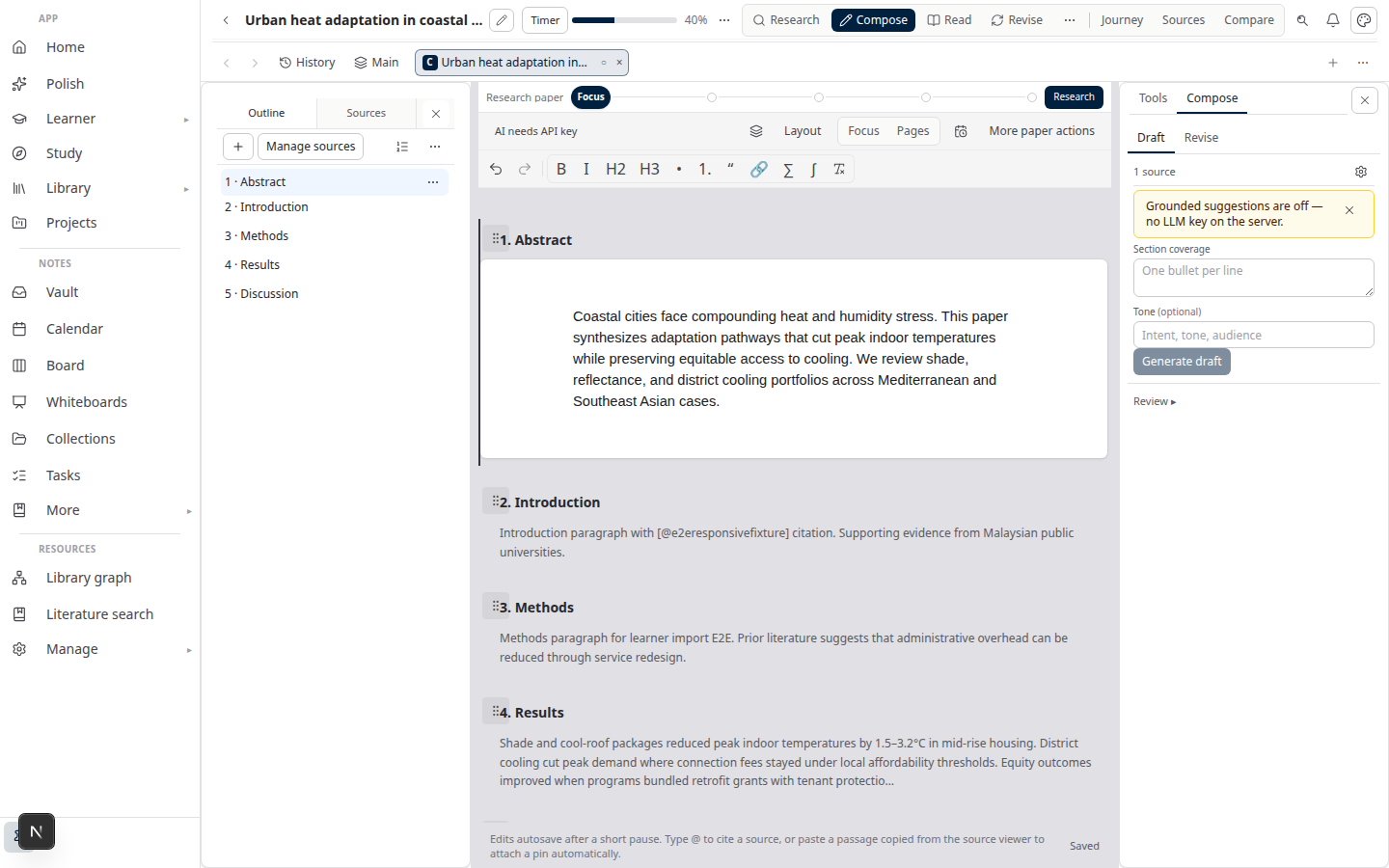
Lattuce Writer compose on lattuce.app

The conflict on paper sections

Academic manuscripts have a different failure mode than team wikis:

Wiki editingManuscript editing
Fast iteration beats perfect auditExport is a legal and academic artifact
Conflicts resolve by last editCitations must map to real sources
Comments suffice for reviewFaculty wants a frozen chapter file

Realtime co-edit on every paragraph makes it hard to answer: “Which version did we submit?” and “Which citation supported this sentence on export day?”

Lattuce uses approval gates — a section exports only when an author marks it approved after citation checks.

What ships today

SurfaceCollaboration model
Paper sectionsDraft → citation check → approve → export
Household sharingShared library and papers within a household account
TranslationSegment review in collaborative translation editor
Notes / whiteboardsHousehold editing with default-on realtime collab, presence, and REST/offline fallback — not paper sections

Workflow: Sources to DOCX.

Household realtime collab (notes and whiteboards)

Lattuce ships realtime collaboration on notes and whiteboards inside a household — see ADR 0030 on CRDT collab (COLLAB_CRDT_ENABLED=0 is the operator rollback to REST/offline sync). Even with live notes:

  • Paper sections keep approval gates — export integrity is non-negotiable
  • Org-wide facilitation (Miro Engage scale) stays out of scope

Do not expect Overleaf-style simultaneous LaTeX editing in Writer — LaTeX is an export path, not the primary canvas.

What we defer

DeferredWhy
Realtime co-edit on approved paper sectionsBreaks export audit trail
Org-wide team wiki replacementNotion complement — why not replace Notion
“Google Docs but with AI” positioningWe defend grounded compose, not generic block chat

When to use which tool

Use Google Docs / Notion when…Use Lattuce when…
Co-authors edit prose live in one docSections need citation verification before export
Comments and suggestions are enoughYou run literature missions then compose
No bibliography integrity gateWord export must match attached library

Fair comparison: Google Docs vs Lattuce.

Bottom line

Realtime co-edit wins speed on shared blocks. Section approval wins trust on submitted manuscripts. Lattuce picks the second because that is what graduate authors actually get graded on.

Related reading

  • Google Docs vs Lattuce
  • Lattuce vs Notion
  • Sources to DOCX in Lattuce

Bahasa Melayu: Mengapa kelulusan seksyen mengatasi suntingan serentak untuk kertas akademik

PreviousData residency for university labs in MalaysiaNextResearch signals and feeds in Lattuce — headlines on home, sources in your library

Workflow guides

  1. 1. Where you can use Lattuce today — cloud, Windows, and Android
  2. 2. Lattuce at lattuce.app is in alpha — what that means for you
  3. 3. Try Lattuce without signing up — interactive demos at lattuce.app/try
  4. 4. Leaving Lattuce cleanly — try first, delete when you need to
  5. 5. Literature review with Lattuce — from search to a cited Word file
  6. 6. Study vs Learner in Lattuce — exam prep or language learning?
  7. 7. Thesis format check in Lattuce — upload Word, fix layout, verify before you submit
  8. 8. BYOK on Lattuce — bring your own AI keys
  9. 9. Sources to DOCX in Lattuce — end-to-end manuscript workflow
  10. 10. BYOS on Lattuce — bring your own storage
  11. 11. Research missions in Lattuce — structured synthesis with evidence export
  12. 12. Use Lattuce from Cursor and Claude — your research in your IDE
  13. 13. Source Digest in Lattuce Study — audio, tables, mind maps, and flashcards
  14. 14. Workspace Ask for a household lab — grounded Q&A over your vault
  15. 15. Query canvas in Lattuce — live boards from your notes vault
  16. 16. Zotero to BibTeX in Lattuce — import, cite, and hand off bibliographies
  17. 17. Notes view layouts in Lattuce — Live, Read, and a sticky outline
  18. 18. Household admin's first week with Lattuce — checks and day-two tasks
  19. 19. Notes catalog layouts in Lattuce — Table, Board, Timeline, and saved views for your vault
  20. 20. Household billing and /pricing on Lattuce — transparent tiers for shared accounts
  21. 21. Version history in Lattuce — compare checkpoints, restore with confidence, and a three-tier workspace
  22. 22. Why Lattuce is not trying to replace Notion
  23. 23. Citation style preview in Lattuce — compare APA, MLA, Chicago, and more before you export
  24. 24. Research stack in 2026 — where Lattuce on lattuce.app sits
  25. 25. Supported citation formats in Lattuce — APA, Vancouver, Nature, and 27 more
  26. 26. Data residency for university labs in Malaysia
  27. You are here27. Why section approval beats realtime co-edit for academic papers
  28. 28. Research signals and feeds in Lattuce — headlines on home, sources in your library
  29. 29. Open catalogs Lattuce connects to — scholarly search, OA links, and books
  30. 30. How to export a cited thesis chapter to Word from Lattuce
  31. 31. Household Free vs Pro on lattuce.app — which plan fits your lab?
  32. 32. Try Lattuce Writer demo walkthrough — cited drafting without an account
  33. 33. Notes Live vs Read vs Split — when to use which in Lattuce
  34. 34. Citation styles for Malaysian universities in Lattuce Writer
  35. 35. From PDF highlight to cited paragraph in Lattuce
  36. 36. Leaving Notion pages in place — handoff checklist for Lattuce research
  37. 37. Alpha feedback — how to report useful bugs on lattuce.app

On this page

  1. The conflict on paper sections
  2. What ships today
  3. Household realtime collab (notes and whiteboards)
  4. What we defer
  5. When to use which tool
  6. Bottom line
  7. Related reading

Explore Lattuce

Start writing, compare tools, or browse tutorials for your research stack.

Try LattuceTutorialsPlans

Subscribe to Workflow guides: RSS · Atom

← All posts
TermsPrivacyCookiesRefundsFAQContact[email protected]

© Lattuce

Skip to content
Blog
  1. Blog
  2. /
  3. Workflow guides
  4. /
  5. Why section approval beats realtime co-edit for academic papers

March 20, 2027 · Workflow guides

Why section approval beats realtime co-edit for academic papers

Lattuce defers org-wide realtime co-edit on paper sections — section approval and export integrity matter more for manuscripts.

  • guide
  • positioning
  • writer
  • collaboration
  • seo
LanguageEnglishBahasa Melayu

Google Docs and Notion optimise for simultaneous block editing — great for memos and wikis. Lattuce optimises for section approval and citation integrity before Word export — great for theses, journal articles, and bilingual papers on lattuce.app.

That is a product choice, not a missing feature we forgot to ship.

Lattuce Writer compose on lattuce.app

The conflict on paper sections

Academic manuscripts have a different failure mode than team wikis:

Wiki editingManuscript editing
Fast iteration beats perfect auditExport is a legal and academic artifact
Conflicts resolve by last editCitations must map to real sources
Comments suffice for reviewFaculty wants a frozen chapter file

Realtime co-edit on every paragraph makes it hard to answer: “Which version did we submit?” and “Which citation supported this sentence on export day?”

Lattuce uses approval gates — a section exports only when an author marks it approved after citation checks.

What ships today

SurfaceCollaboration model
Paper sectionsDraft → citation check → approve → export
Household sharingShared library and papers within a household account
TranslationSegment review in collaborative translation editor
Notes / whiteboardsHousehold editing with default-on realtime collab, presence, and REST/offline fallback — not paper sections

Workflow: Sources to DOCX.

Household realtime collab (notes and whiteboards)

Lattuce ships realtime collaboration on notes and whiteboards inside a household — see ADR 0030 on CRDT collab (COLLAB_CRDT_ENABLED=0 is the operator rollback to REST/offline sync). Even with live notes:

  • Paper sections keep approval gates — export integrity is non-negotiable
  • Org-wide facilitation (Miro Engage scale) stays out of scope

Do not expect Overleaf-style simultaneous LaTeX editing in Writer — LaTeX is an export path, not the primary canvas.

What we defer

DeferredWhy
Realtime co-edit on approved paper sectionsBreaks export audit trail
Org-wide team wiki replacementNotion complement — why not replace Notion
“Google Docs but with AI” positioningWe defend grounded compose, not generic block chat

When to use which tool

Use Google Docs / Notion when…Use Lattuce when…
Co-authors edit prose live in one docSections need citation verification before export
Comments and suggestions are enoughYou run literature missions then compose
No bibliography integrity gateWord export must match attached library

Fair comparison: Google Docs vs Lattuce.

Bottom line

Realtime co-edit wins speed on shared blocks. Section approval wins trust on submitted manuscripts. Lattuce picks the second because that is what graduate authors actually get graded on.

Related reading

  • Google Docs vs Lattuce
  • Lattuce vs Notion
  • Sources to DOCX in Lattuce

Bahasa Melayu: Mengapa kelulusan seksyen mengatasi suntingan serentak untuk kertas akademik

PreviousData residency for university labs in MalaysiaNextResearch signals and feeds in Lattuce — headlines on home, sources in your library

Workflow guides

  1. 1. Where you can use Lattuce today — cloud, Windows, and Android
  2. 2. Lattuce at lattuce.app is in alpha — what that means for you
  3. 3. Try Lattuce without signing up — interactive demos at lattuce.app/try
  4. 4. Leaving Lattuce cleanly — try first, delete when you need to
  5. 5. Literature review with Lattuce — from search to a cited Word file
  6. 6. Study vs Learner in Lattuce — exam prep or language learning?
  7. 7. Thesis format check in Lattuce — upload Word, fix layout, verify before you submit
  8. 8. BYOK on Lattuce — bring your own AI keys
  9. 9. Sources to DOCX in Lattuce — end-to-end manuscript workflow
  10. 10. BYOS on Lattuce — bring your own storage
  11. 11. Research missions in Lattuce — structured synthesis with evidence export
  12. 12. Use Lattuce from Cursor and Claude — your research in your IDE
  13. 13. Source Digest in Lattuce Study — audio, tables, mind maps, and flashcards
  14. 14. Workspace Ask for a household lab — grounded Q&A over your vault
  15. 15. Query canvas in Lattuce — live boards from your notes vault
  16. 16. Zotero to BibTeX in Lattuce — import, cite, and hand off bibliographies
  17. 17. Notes view layouts in Lattuce — Live, Read, and a sticky outline
  18. 18. Household admin's first week with Lattuce — checks and day-two tasks
  19. 19. Notes catalog layouts in Lattuce — Table, Board, Timeline, and saved views for your vault
  20. 20. Household billing and /pricing on Lattuce — transparent tiers for shared accounts
  21. 21. Version history in Lattuce — compare checkpoints, restore with confidence, and a three-tier workspace
  22. 22. Why Lattuce is not trying to replace Notion
  23. 23. Citation style preview in Lattuce — compare APA, MLA, Chicago, and more before you export
  24. 24. Research stack in 2026 — where Lattuce on lattuce.app sits
  25. 25. Supported citation formats in Lattuce — APA, Vancouver, Nature, and 27 more
  26. 26. Data residency for university labs in Malaysia
  27. You are here27. Why section approval beats realtime co-edit for academic papers
  28. 28. Research signals and feeds in Lattuce — headlines on home, sources in your library
  29. 29. Open catalogs Lattuce connects to — scholarly search, OA links, and books
  30. 30. How to export a cited thesis chapter to Word from Lattuce
  31. 31. Household Free vs Pro on lattuce.app — which plan fits your lab?
  32. 32. Try Lattuce Writer demo walkthrough — cited drafting without an account
  33. 33. Notes Live vs Read vs Split — when to use which in Lattuce
  34. 34. Citation styles for Malaysian universities in Lattuce Writer
  35. 35. From PDF highlight to cited paragraph in Lattuce
  36. 36. Leaving Notion pages in place — handoff checklist for Lattuce research
  37. 37. Alpha feedback — how to report useful bugs on lattuce.app

On this page

  1. The conflict on paper sections
  2. What ships today
  3. Household realtime collab (notes and whiteboards)
  4. What we defer
  5. When to use which tool
  6. Bottom line
  7. Related reading

Explore Lattuce

Start writing, compare tools, or browse tutorials for your research stack.

Try LattuceTutorialsPlans

Subscribe to Workflow guides: RSS · Atom

← All posts
TermsPrivacyCookiesRefundsFAQContact[email protected]

© Lattuce