Loading home
Loading home
Skip to content
Blog
  1. Blog
  2. /
  3. Workflow guides
  4. /
  5. Household billing and /pricing on Lattuce — transparent tiers for shared accounts

January 30, 2027 · Workflow guides

Household billing and /pricing on Lattuce — transparent tiers for shared accounts

How household plans, /pricing, and alpha complimentary Pro work on lattuce.app — transparent tiers without operator jargon.

  • guide
  • billing
  • pricing
  • household
  • seo
LanguageEnglishBahasa Melayu

Lattuce bills at the household level on lattuce.app — one shared quota for library sources, papers, Learner content, and optional AI capacity. The public pricing page explains tiers in plain language; this guide connects plans to everyday research work.
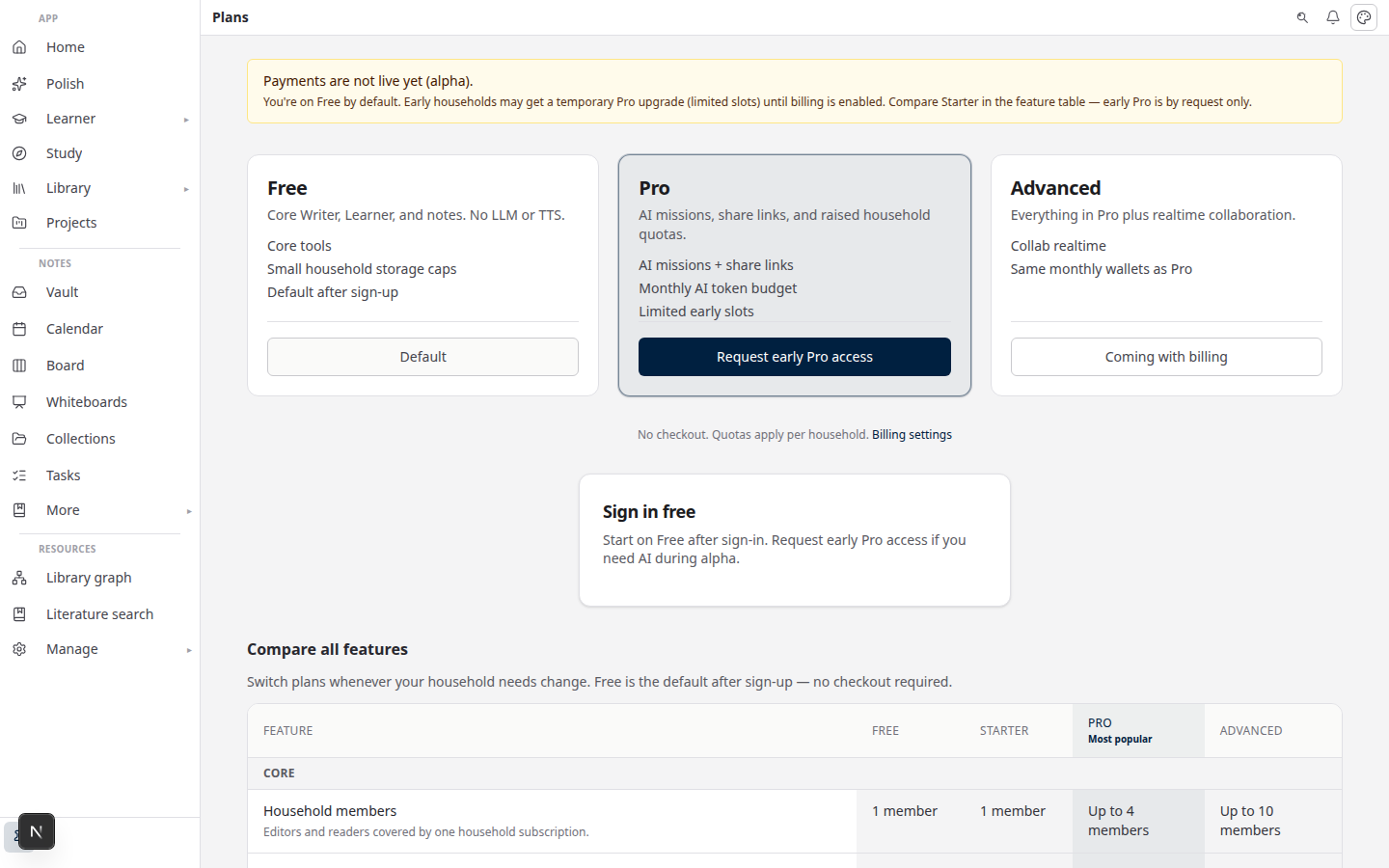
Lattuce pricing on lattuce.app

Who this is for

You are…Read this when…
Household adminYou choose Free vs Pro before inviting lab members
Graduate studentYou hit a library or paper limit
Alpha userCheckout is off but complimentary Pro may be available

Operator Paddle webhooks and Unleash flags live in internal docs — not duplicated here.

What shipped

PieceWhat it does
Household plansFree, Pro, and Team-style tiers with resource caps
Fail-closed gatesOver-quota creates block instead of silent overage
Usage metersLLM tokens and TTS characters shown in settings (not dollar amounts to end users)
Feature flagsPlan-controlled surfaces (e.g. collab pilots) via entitlements
Public /pricingSide-by-side tier comparison at lattuce.app/pricing

Alpha posture today: entitlements on, self-serve checkout may be off — see below.

Public /pricing page

Visit lattuce.app/pricing for:

  • Feature rows (library limits, papers, Learner items, AI capacity)
  • Free vs Pro vs advanced household tiers
  • Alpha banner when payments are not live yet (“Request early Pro access” → contact)

The page is the canonical marketing copy — blog posts link there instead of duplicating numbers that change.

BYOK vs plan gates

MechanismPurpose
Plan quotasHow many sources, papers, and Learner imports your household can hold
AI walletsMonthly estimated token/character budgets per household
BYOKYour own provider keys for model calls — BYOK guide

BYOK answers who bills the model. Plan gates answer how much library and AI capacity the household gets on lattuce.app.

When checkout is disabled during alpha, complimentary manual Pro grants may apply (capped). Settings show “Complimentary until paid plans go live.”

Getting started

  1. Sign in at lattuce.app.
  2. Open Settings → Billing (or Account → Plan).
  3. Compare your usage meters against limits.
  4. Add BYOK keys if you need missions, compose, or digest beyond included capacity.
  5. When checkout goes live, upgrade from /pricing or the in-app upgrade CTA.

Do not paste Paddle keys or webhook secrets into notes or chat.

What remains deferred

DeferredWhy
Global SaaS product domainHousehold billing on lattuce.app first
AI quota SKUs as separate productsWallets + BYOK cover alpha needs
Org-wide enterprise contractsHousehold scope today — not Notion-scale seat admin

Self-serve install billing is a separate track — public blog does not market self-host; see cloud availability.

Related reading

  • BYOK on Lattuce
  • Household admin's first week
  • Lattuce cloud availability

Bahasa Melayu: Pengebilan isi rumah dan /pricing di Lattuce — tier telus untuk akaun kongsi

PreviousNotes catalog layouts in Lattuce — Table, Board, Timeline, and saved views for your vaultNextVersion history in Lattuce — compare checkpoints, restore with confidence, and a three-tier workspace

Workflow guides

  1. 1. Where you can use Lattuce today — cloud, Windows, and Android
  2. 2. Lattuce at lattuce.app is in alpha — what that means for you
  3. 3. Try Lattuce without signing up — interactive demos at lattuce.app/try
  4. 4. Leaving Lattuce cleanly — try first, delete when you need to
  5. 5. Literature review with Lattuce — from search to a cited Word file
  6. 6. Study vs Learner in Lattuce — exam prep or language learning?
  7. 7. Thesis format check in Lattuce — upload Word, fix layout, verify before you submit
  8. 8. BYOK on Lattuce — bring your own AI keys
  9. 9. Sources to DOCX in Lattuce — end-to-end manuscript workflow
  10. 10. BYOS on Lattuce — bring your own storage
  11. 11. Research missions in Lattuce — structured synthesis with evidence export
  12. 12. Use Lattuce from Cursor and Claude — your research in your IDE
  13. 13. Source Digest in Lattuce Study — audio, tables, mind maps, and flashcards
  14. 14. Workspace Ask for a household lab — grounded Q&A over your vault
  15. 15. Query canvas in Lattuce — live boards from your notes vault
  16. 16. Zotero to BibTeX in Lattuce — import, cite, and hand off bibliographies
  17. 17. Notes view layouts in Lattuce — Live, Read, and a sticky outline
  18. 18. Household admin's first week with Lattuce — checks and day-two tasks
  19. 19. Notes catalog layouts in Lattuce — Table, Board, Timeline, and saved views for your vault
  20. You are here20. Household billing and /pricing on Lattuce — transparent tiers for shared accounts
  21. 21. Version history in Lattuce — compare checkpoints, restore with confidence, and a three-tier workspace
  22. 22. Why Lattuce is not trying to replace Notion
  23. 23. Citation style preview in Lattuce — compare APA, MLA, Chicago, and more before you export
  24. 24. Research stack in 2026 — where Lattuce on lattuce.app sits
  25. 25. Supported citation formats in Lattuce — APA, Vancouver, Nature, and 27 more
  26. 26. Data residency for university labs in Malaysia
  27. 27. Why section approval beats realtime co-edit for academic papers
  28. 28. Research signals and feeds in Lattuce — headlines on home, sources in your library
  29. 29. Open catalogs Lattuce connects to — scholarly search, OA links, and books
  30. 30. How to export a cited thesis chapter to Word from Lattuce
  31. 31. Household Free vs Pro on lattuce.app — which plan fits your lab?
  32. 32. Try Lattuce Writer demo walkthrough — cited drafting without an account
  33. 33. Notes Live vs Read vs Split — when to use which in Lattuce
  34. 34. Citation styles for Malaysian universities in Lattuce Writer
  35. 35. From PDF highlight to cited paragraph in Lattuce
  36. 36. Leaving Notion pages in place — handoff checklist for Lattuce research
  37. 37. Alpha feedback — how to report useful bugs on lattuce.app

On this page

  1. Who this is for
  2. What shipped
  3. Public /pricing page
  4. BYOK vs plan gates
  5. Getting started
  6. What remains deferred
  7. Related reading

Explore Lattuce

Start writing, compare tools, or browse tutorials for your research stack.

Try LattuceTutorialsPlans

Subscribe to Workflow guides: RSS · Atom

← All posts
TermsPrivacyCookiesRefundsFAQContact[email protected]

© Lattuce

Skip to content
Blog
  1. Blog
  2. /
  3. Workflow guides
  4. /
  5. Household billing and /pricing on Lattuce — transparent tiers for shared accounts

January 30, 2027 · Workflow guides

Household billing and /pricing on Lattuce — transparent tiers for shared accounts

How household plans, /pricing, and alpha complimentary Pro work on lattuce.app — transparent tiers without operator jargon.

  • guide
  • billing
  • pricing
  • household
  • seo
LanguageEnglishBahasa Melayu

Lattuce bills at the household level on lattuce.app — one shared quota for library sources, papers, Learner content, and optional AI capacity. The public pricing page explains tiers in plain language; this guide connects plans to everyday research work.

Lattuce pricing on lattuce.app

Who this is for

You are…Read this when…
Household adminYou choose Free vs Pro before inviting lab members
Graduate studentYou hit a library or paper limit
Alpha userCheckout is off but complimentary Pro may be available

Operator Paddle webhooks and Unleash flags live in internal docs — not duplicated here.

What shipped

PieceWhat it does
Household plansFree, Pro, and Team-style tiers with resource caps
Fail-closed gatesOver-quota creates block instead of silent overage
Usage metersLLM tokens and TTS characters shown in settings (not dollar amounts to end users)
Feature flagsPlan-controlled surfaces (e.g. collab pilots) via entitlements
Public /pricingSide-by-side tier comparison at lattuce.app/pricing

Alpha posture today: entitlements on, self-serve checkout may be off — see below.

Public /pricing page

Visit lattuce.app/pricing for:

  • Feature rows (library limits, papers, Learner items, AI capacity)
  • Free vs Pro vs advanced household tiers
  • Alpha banner when payments are not live yet (“Request early Pro access” → contact)

The page is the canonical marketing copy — blog posts link there instead of duplicating numbers that change.

BYOK vs plan gates

MechanismPurpose
Plan quotasHow many sources, papers, and Learner imports your household can hold
AI walletsMonthly estimated token/character budgets per household
BYOKYour own provider keys for model calls — BYOK guide

BYOK answers who bills the model. Plan gates answer how much library and AI capacity the household gets on lattuce.app.

When checkout is disabled during alpha, complimentary manual Pro grants may apply (capped). Settings show “Complimentary until paid plans go live.”

Getting started

  1. Sign in at lattuce.app.
  2. Open Settings → Billing (or Account → Plan).
  3. Compare your usage meters against limits.
  4. Add BYOK keys if you need missions, compose, or digest beyond included capacity.
  5. When checkout goes live, upgrade from /pricing or the in-app upgrade CTA.

Do not paste Paddle keys or webhook secrets into notes or chat.

What remains deferred

DeferredWhy
Global SaaS product domainHousehold billing on lattuce.app first
AI quota SKUs as separate productsWallets + BYOK cover alpha needs
Org-wide enterprise contractsHousehold scope today — not Notion-scale seat admin

Self-serve install billing is a separate track — public blog does not market self-host; see cloud availability.

Related reading

  • BYOK on Lattuce
  • Household admin's first week
  • Lattuce cloud availability

Bahasa Melayu: Pengebilan isi rumah dan /pricing di Lattuce — tier telus untuk akaun kongsi

PreviousNotes catalog layouts in Lattuce — Table, Board, Timeline, and saved views for your vaultNextVersion history in Lattuce — compare checkpoints, restore with confidence, and a three-tier workspace

Workflow guides

  1. 1. Where you can use Lattuce today — cloud, Windows, and Android
  2. 2. Lattuce at lattuce.app is in alpha — what that means for you
  3. 3. Try Lattuce without signing up — interactive demos at lattuce.app/try
  4. 4. Leaving Lattuce cleanly — try first, delete when you need to
  5. 5. Literature review with Lattuce — from search to a cited Word file
  6. 6. Study vs Learner in Lattuce — exam prep or language learning?
  7. 7. Thesis format check in Lattuce — upload Word, fix layout, verify before you submit
  8. 8. BYOK on Lattuce — bring your own AI keys
  9. 9. Sources to DOCX in Lattuce — end-to-end manuscript workflow
  10. 10. BYOS on Lattuce — bring your own storage
  11. 11. Research missions in Lattuce — structured synthesis with evidence export
  12. 12. Use Lattuce from Cursor and Claude — your research in your IDE
  13. 13. Source Digest in Lattuce Study — audio, tables, mind maps, and flashcards
  14. 14. Workspace Ask for a household lab — grounded Q&A over your vault
  15. 15. Query canvas in Lattuce — live boards from your notes vault
  16. 16. Zotero to BibTeX in Lattuce — import, cite, and hand off bibliographies
  17. 17. Notes view layouts in Lattuce — Live, Read, and a sticky outline
  18. 18. Household admin's first week with Lattuce — checks and day-two tasks
  19. 19. Notes catalog layouts in Lattuce — Table, Board, Timeline, and saved views for your vault
  20. You are here20. Household billing and /pricing on Lattuce — transparent tiers for shared accounts
  21. 21. Version history in Lattuce — compare checkpoints, restore with confidence, and a three-tier workspace
  22. 22. Why Lattuce is not trying to replace Notion
  23. 23. Citation style preview in Lattuce — compare APA, MLA, Chicago, and more before you export
  24. 24. Research stack in 2026 — where Lattuce on lattuce.app sits
  25. 25. Supported citation formats in Lattuce — APA, Vancouver, Nature, and 27 more
  26. 26. Data residency for university labs in Malaysia
  27. 27. Why section approval beats realtime co-edit for academic papers
  28. 28. Research signals and feeds in Lattuce — headlines on home, sources in your library
  29. 29. Open catalogs Lattuce connects to — scholarly search, OA links, and books
  30. 30. How to export a cited thesis chapter to Word from Lattuce
  31. 31. Household Free vs Pro on lattuce.app — which plan fits your lab?
  32. 32. Try Lattuce Writer demo walkthrough — cited drafting without an account
  33. 33. Notes Live vs Read vs Split — when to use which in Lattuce
  34. 34. Citation styles for Malaysian universities in Lattuce Writer
  35. 35. From PDF highlight to cited paragraph in Lattuce
  36. 36. Leaving Notion pages in place — handoff checklist for Lattuce research
  37. 37. Alpha feedback — how to report useful bugs on lattuce.app

On this page

  1. Who this is for
  2. What shipped
  3. Public /pricing page
  4. BYOK vs plan gates
  5. Getting started
  6. What remains deferred
  7. Related reading

Explore Lattuce

Start writing, compare tools, or browse tutorials for your research stack.

Try LattuceTutorialsPlans

Subscribe to Workflow guides: RSS · Atom

← All posts
TermsPrivacyCookiesRefundsFAQContact[email protected]

© Lattuce