Loading home
Loading home
Skip to content
Blog
  1. Blog
  2. /
  3. Workflow guides
  4. /
  5. Research signals and feeds in Lattuce — headlines on home, sources in your library

September 12, 2026 · Workflow guides

Research signals and feeds in Lattuce — headlines on home, sources in your library

Follow RSS feeds and OpenAlex research topics in Lattuce: glance at the home ticker, summarize headlines, and save items to your library.

  • guide
  • feeds
  • research
  • rss
  • writer
  • seo

You open Lattuce to write — but the field keeps moving. New preprints land overnight. A lab blog posts a methods update. A journal you follow publishes ahead of print.

Research signals keep a lightweight pulse on that stream without pulling you out of your workspace. A scrolling ticker on home shows recent headlines; the full Feeds page is where you subscribe, filter, summarize, and save items into your library.
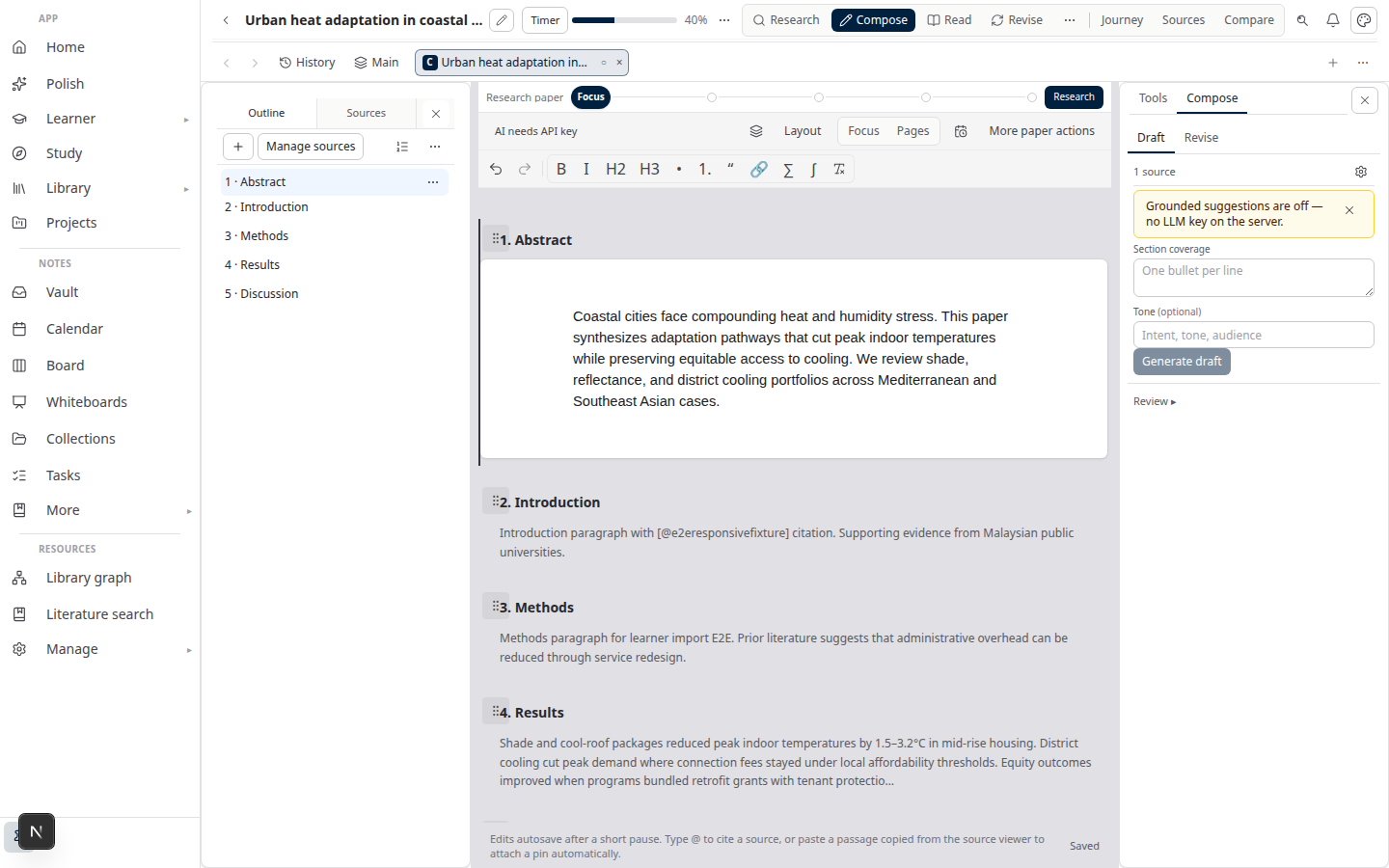
Lattuce Writer — from sources to cited draft

This guide is for researchers and authors who want awareness first, depth on demand — not another inbox to triage all day.

Before you start

NeedWhat to do
A Lattuce accountSign in at lattuce.app
New to Lattuce?See Getting started
Returning home layoutThe ticker appears on the signed-in home dashboard (not the first-visit title screen)
Personal subscriptions (optional)Starter or higher on your plan
Morning briefing (optional)Pro or Team
Summarize (optional)Included on all plans; daily quota applies

AI features like summarize and briefing run on your plan's included capacity, and you can add your own AI provider keys in settings — see BYOK on Lattuce. Lattuce is cloud-only at lattuce.app today; see where you can use Lattuce for the device picture.

Two surfaces, one workflow

Home ticker — glanceable headlines

On home, a compact ticker dock sits along the bottom of the screen (on classic layout). It shows a rotating strip of recent headlines from your feeds and subscribed research topics.

From the ticker you can:

  • Skim titles and open the original link in a new tab
  • Filter by all headlines, publications only, or a specific research topic you follow
  • Summarize a headline (brief digest) — included on every plan, with a daily quota
  • Save a headline to your library for later reading or attaching to a paper
  • Collapse the dock when you want more screen space, or unpin it so it scrolls with the page
  • Open All feeds for the full reader

The ticker is designed to stay out of the way: icon-only controls, short source labels (RSS URLs are shortened to readable names like “Malaysiakini” or “BBC”), and a collapse mode that shows a headline count instead of the full strip.

On themed desktop layouts (for example Windows 95 or Minecraft home), the ticker stays available but defaults to collapsed so it does not cover your desktop windows.

Feeds page — subscribe, read, brief, save

Open Feeds from the ticker or your navigation. This is the control room.

AreaWhat it does
Today's briefingAI-generated digest of unread headlines (Pro/Team)
Research topicsFollow a topic; Lattuce pulls recent publications from OpenAlex
RSS subscriptionsAdd any RSS or Atom feed URL
ReaderBrowse headlines, mark read, summarize, save to library
OPML importBring subscriptions from another reader

Research topics are keyword-style follows — for example sparse autoencoders interpretability with an optional “from year” filter. After you add a topic, Lattuce fetches matching publications in the background; refresh when you want a manual update.

RSS feeds work the way you expect from any reader: paste a feed URL, subscribe, and new items appear in the reader and home ticker.

A typical day

  1. Sign in — home loads your agenda and the ticker prefetches recent headlines.
  2. Glance at the ticker — anything worth a click opens in the source site; anything worth keeping gets Save.
  3. Need context fast? — Summarize on the headline for a short digest before you commit time.
  4. Morning depth — on Feeds, generate Today's briefing for a digest of unread headlines (Pro/Team).
  5. Write with what you saved — open Library, attach saved sources to a paper, and continue in literature review with Lattuce or a research mission.

How this fits the rest of Lattuce

Research signals are the front door, not the whole house.

StageTool
Notice new workHome ticker + Feeds
Save for laterSave to library
Read and annotateLibrary source viewer
Synthesize and citeWriter missions + paper workspace

If you already use Zotero or another reference manager, think of feeds as discovery and triage inside Lattuce — save brings an item into the same library you use when writing.

Compared to a standalone RSS reader, Lattuce adds a path from headline → library → cited Word export without re-exporting metadata. Compared to chat-over-PDF tools, feeds keep provenance: you always know which feed or topic surfaced an item before you save it.

See NotebookLM vs Lattuce for how digest-style tools differ from a full writing stack.

Tips

  • Start with one RSS feed and one research topic — validate the workflow before importing a large OPML file.
  • Use topic filters on the ticker when you are deep in one line of work; switch back to All when you want the full pulse.
  • Collapse the dock during long writing sessions on home; expand when you are in scan mode.
  • Watch summarize quota on busy days — save to library first, summarize only what you might actually read.

Limits and honesty

  • Feeds refresh on a schedule; the ticker is not a live newswire.
  • OpenAlex topic matching depends on how you phrase the query — refine topics that are too broad or too quiet.
  • Plan gates apply: personal subscriptions and briefing are entitlement-controlled; the Feeds page shows plain-language notices when a feature is unavailable.
  • Summarize produces a brief digest, not a substitute for reading the paper or running a full literature mission.

Related reading

  • Literature review with Lattuce — from saved sources to cited Word export
  • Research missions in Lattuce — structured synthesis over your corpus
  • Lattuce vs research apps — where feeds sit in the broader landscape
  • Where you can use Lattuce today — cloud now, Windows and Android apps on the way
PreviousWhy section approval beats realtime co-edit for academic papersNextOpen catalogs Lattuce connects to — scholarly search, OA links, and books

Workflow guides

  1. 1. Where you can use Lattuce today — cloud, Windows, and Android
  2. 2. Lattuce at lattuce.app is in alpha — what that means for you
  3. 3. Try Lattuce without signing up — interactive demos at lattuce.app/try
  4. 4. Leaving Lattuce cleanly — try first, delete when you need to
  5. 5. Literature review with Lattuce — from search to a cited Word file
  6. 6. Study vs Learner in Lattuce — exam prep or language learning?
  7. 7. Thesis format check in Lattuce — upload Word, fix layout, verify before you submit
  8. 8. BYOK on Lattuce — bring your own AI keys
  9. 9. Sources to DOCX in Lattuce — end-to-end manuscript workflow
  10. 10. BYOS on Lattuce — bring your own storage
  11. 11. Research missions in Lattuce — structured synthesis with evidence export
  12. 12. Use Lattuce from Cursor and Claude — your research in your IDE
  13. 13. Source Digest in Lattuce Study — audio, tables, mind maps, and flashcards
  14. 14. Workspace Ask for a household lab — grounded Q&A over your vault
  15. 15. Query canvas in Lattuce — live boards from your notes vault
  16. 16. Zotero to BibTeX in Lattuce — import, cite, and hand off bibliographies
  17. 17. Notes view layouts in Lattuce — Live, Read, and a sticky outline
  18. 18. Household admin's first week with Lattuce — checks and day-two tasks
  19. 19. Notes catalog layouts in Lattuce — Table, Board, Timeline, and saved views for your vault
  20. 20. Household billing and /pricing on Lattuce — transparent tiers for shared accounts
  21. 21. Version history in Lattuce — compare checkpoints, restore with confidence, and a three-tier workspace
  22. 22. Why Lattuce is not trying to replace Notion
  23. 23. Citation style preview in Lattuce — compare APA, MLA, Chicago, and more before you export
  24. 24. Research stack in 2026 — where Lattuce on lattuce.app sits
  25. 25. Supported citation formats in Lattuce — APA, Vancouver, Nature, and 27 more
  26. 26. Data residency for university labs in Malaysia
  27. 27. Why section approval beats realtime co-edit for academic papers
  28. You are here28. Research signals and feeds in Lattuce — headlines on home, sources in your library
  29. 29. Open catalogs Lattuce connects to — scholarly search, OA links, and books
  30. 30. How to export a cited thesis chapter to Word from Lattuce
  31. 31. Household Free vs Pro on lattuce.app — which plan fits your lab?
  32. 32. Try Lattuce Writer demo walkthrough — cited drafting without an account
  33. 33. Notes Live vs Read vs Split — when to use which in Lattuce
  34. 34. Citation styles for Malaysian universities in Lattuce Writer
  35. 35. From PDF highlight to cited paragraph in Lattuce
  36. 36. Leaving Notion pages in place — handoff checklist for Lattuce research
  37. 37. Alpha feedback — how to report useful bugs on lattuce.app

On this page

  1. Before you start
  2. Two surfaces, one workflow
  3. Home ticker — glanceable headlines
  4. Feeds page — subscribe, read, brief, save
  5. A typical day
  6. How this fits the rest of Lattuce
  7. Tips
  8. Limits and honesty
  9. Related reading

Explore Lattuce

Start writing, compare tools, or browse tutorials for your research stack.

Try LattuceTutorialsPlans

Subscribe to Workflow guides: RSS · Atom

← All posts
TermsPrivacyCookiesRefundsFAQContact[email protected]

© Lattuce

Skip to content
Blog
  1. Blog
  2. /
  3. Workflow guides
  4. /
  5. Research signals and feeds in Lattuce — headlines on home, sources in your library

September 12, 2026 · Workflow guides

Research signals and feeds in Lattuce — headlines on home, sources in your library

Follow RSS feeds and OpenAlex research topics in Lattuce: glance at the home ticker, summarize headlines, and save items to your library.

  • guide
  • feeds
  • research
  • rss
  • writer
  • seo

You open Lattuce to write — but the field keeps moving. New preprints land overnight. A lab blog posts a methods update. A journal you follow publishes ahead of print.

Research signals keep a lightweight pulse on that stream without pulling you out of your workspace. A scrolling ticker on home shows recent headlines; the full Feeds page is where you subscribe, filter, summarize, and save items into your library.

Lattuce Writer — from sources to cited draft

This guide is for researchers and authors who want awareness first, depth on demand — not another inbox to triage all day.

Before you start

NeedWhat to do
A Lattuce accountSign in at lattuce.app
New to Lattuce?See Getting started
Returning home layoutThe ticker appears on the signed-in home dashboard (not the first-visit title screen)
Personal subscriptions (optional)Starter or higher on your plan
Morning briefing (optional)Pro or Team
Summarize (optional)Included on all plans; daily quota applies

AI features like summarize and briefing run on your plan's included capacity, and you can add your own AI provider keys in settings — see BYOK on Lattuce. Lattuce is cloud-only at lattuce.app today; see where you can use Lattuce for the device picture.

Two surfaces, one workflow

Home ticker — glanceable headlines

On home, a compact ticker dock sits along the bottom of the screen (on classic layout). It shows a rotating strip of recent headlines from your feeds and subscribed research topics.

From the ticker you can:

  • Skim titles and open the original link in a new tab
  • Filter by all headlines, publications only, or a specific research topic you follow
  • Summarize a headline (brief digest) — included on every plan, with a daily quota
  • Save a headline to your library for later reading or attaching to a paper
  • Collapse the dock when you want more screen space, or unpin it so it scrolls with the page
  • Open All feeds for the full reader

The ticker is designed to stay out of the way: icon-only controls, short source labels (RSS URLs are shortened to readable names like “Malaysiakini” or “BBC”), and a collapse mode that shows a headline count instead of the full strip.

On themed desktop layouts (for example Windows 95 or Minecraft home), the ticker stays available but defaults to collapsed so it does not cover your desktop windows.

Feeds page — subscribe, read, brief, save

Open Feeds from the ticker or your navigation. This is the control room.

AreaWhat it does
Today's briefingAI-generated digest of unread headlines (Pro/Team)
Research topicsFollow a topic; Lattuce pulls recent publications from OpenAlex
RSS subscriptionsAdd any RSS or Atom feed URL
ReaderBrowse headlines, mark read, summarize, save to library
OPML importBring subscriptions from another reader

Research topics are keyword-style follows — for example sparse autoencoders interpretability with an optional “from year” filter. After you add a topic, Lattuce fetches matching publications in the background; refresh when you want a manual update.

RSS feeds work the way you expect from any reader: paste a feed URL, subscribe, and new items appear in the reader and home ticker.

A typical day

  1. Sign in — home loads your agenda and the ticker prefetches recent headlines.
  2. Glance at the ticker — anything worth a click opens in the source site; anything worth keeping gets Save.
  3. Need context fast? — Summarize on the headline for a short digest before you commit time.
  4. Morning depth — on Feeds, generate Today's briefing for a digest of unread headlines (Pro/Team).
  5. Write with what you saved — open Library, attach saved sources to a paper, and continue in literature review with Lattuce or a research mission.

How this fits the rest of Lattuce

Research signals are the front door, not the whole house.

StageTool
Notice new workHome ticker + Feeds
Save for laterSave to library
Read and annotateLibrary source viewer
Synthesize and citeWriter missions + paper workspace

If you already use Zotero or another reference manager, think of feeds as discovery and triage inside Lattuce — save brings an item into the same library you use when writing.

Compared to a standalone RSS reader, Lattuce adds a path from headline → library → cited Word export without re-exporting metadata. Compared to chat-over-PDF tools, feeds keep provenance: you always know which feed or topic surfaced an item before you save it.

See NotebookLM vs Lattuce for how digest-style tools differ from a full writing stack.

Tips

  • Start with one RSS feed and one research topic — validate the workflow before importing a large OPML file.
  • Use topic filters on the ticker when you are deep in one line of work; switch back to All when you want the full pulse.
  • Collapse the dock during long writing sessions on home; expand when you are in scan mode.
  • Watch summarize quota on busy days — save to library first, summarize only what you might actually read.

Limits and honesty

  • Feeds refresh on a schedule; the ticker is not a live newswire.
  • OpenAlex topic matching depends on how you phrase the query — refine topics that are too broad or too quiet.
  • Plan gates apply: personal subscriptions and briefing are entitlement-controlled; the Feeds page shows plain-language notices when a feature is unavailable.
  • Summarize produces a brief digest, not a substitute for reading the paper or running a full literature mission.

Related reading

  • Literature review with Lattuce — from saved sources to cited Word export
  • Research missions in Lattuce — structured synthesis over your corpus
  • Lattuce vs research apps — where feeds sit in the broader landscape
  • Where you can use Lattuce today — cloud now, Windows and Android apps on the way
PreviousWhy section approval beats realtime co-edit for academic papersNextOpen catalogs Lattuce connects to — scholarly search, OA links, and books

Workflow guides

  1. 1. Where you can use Lattuce today — cloud, Windows, and Android
  2. 2. Lattuce at lattuce.app is in alpha — what that means for you
  3. 3. Try Lattuce without signing up — interactive demos at lattuce.app/try
  4. 4. Leaving Lattuce cleanly — try first, delete when you need to
  5. 5. Literature review with Lattuce — from search to a cited Word file
  6. 6. Study vs Learner in Lattuce — exam prep or language learning?
  7. 7. Thesis format check in Lattuce — upload Word, fix layout, verify before you submit
  8. 8. BYOK on Lattuce — bring your own AI keys
  9. 9. Sources to DOCX in Lattuce — end-to-end manuscript workflow
  10. 10. BYOS on Lattuce — bring your own storage
  11. 11. Research missions in Lattuce — structured synthesis with evidence export
  12. 12. Use Lattuce from Cursor and Claude — your research in your IDE
  13. 13. Source Digest in Lattuce Study — audio, tables, mind maps, and flashcards
  14. 14. Workspace Ask for a household lab — grounded Q&A over your vault
  15. 15. Query canvas in Lattuce — live boards from your notes vault
  16. 16. Zotero to BibTeX in Lattuce — import, cite, and hand off bibliographies
  17. 17. Notes view layouts in Lattuce — Live, Read, and a sticky outline
  18. 18. Household admin's first week with Lattuce — checks and day-two tasks
  19. 19. Notes catalog layouts in Lattuce — Table, Board, Timeline, and saved views for your vault
  20. 20. Household billing and /pricing on Lattuce — transparent tiers for shared accounts
  21. 21. Version history in Lattuce — compare checkpoints, restore with confidence, and a three-tier workspace
  22. 22. Why Lattuce is not trying to replace Notion
  23. 23. Citation style preview in Lattuce — compare APA, MLA, Chicago, and more before you export
  24. 24. Research stack in 2026 — where Lattuce on lattuce.app sits
  25. 25. Supported citation formats in Lattuce — APA, Vancouver, Nature, and 27 more
  26. 26. Data residency for university labs in Malaysia
  27. 27. Why section approval beats realtime co-edit for academic papers
  28. You are here28. Research signals and feeds in Lattuce — headlines on home, sources in your library
  29. 29. Open catalogs Lattuce connects to — scholarly search, OA links, and books
  30. 30. How to export a cited thesis chapter to Word from Lattuce
  31. 31. Household Free vs Pro on lattuce.app — which plan fits your lab?
  32. 32. Try Lattuce Writer demo walkthrough — cited drafting without an account
  33. 33. Notes Live vs Read vs Split — when to use which in Lattuce
  34. 34. Citation styles for Malaysian universities in Lattuce Writer
  35. 35. From PDF highlight to cited paragraph in Lattuce
  36. 36. Leaving Notion pages in place — handoff checklist for Lattuce research
  37. 37. Alpha feedback — how to report useful bugs on lattuce.app

On this page

  1. Before you start
  2. Two surfaces, one workflow
  3. Home ticker — glanceable headlines
  4. Feeds page — subscribe, read, brief, save
  5. A typical day
  6. How this fits the rest of Lattuce
  7. Tips
  8. Limits and honesty
  9. Related reading

Explore Lattuce

Start writing, compare tools, or browse tutorials for your research stack.

Try LattuceTutorialsPlans

Subscribe to Workflow guides: RSS · Atom

← All posts
TermsPrivacyCookiesRefundsFAQContact[email protected]

© Lattuce