Loading home
Loading home
Skip to content
Blog
  1. Blog
  2. /
  3. Tool comparisons
  4. /
  5. Paperpile and Mendeley vs Lattuce — reference managers or writing pipeline?

May 8, 2027 · Tool comparisons

Paperpile and Mendeley vs Lattuce — reference managers or writing pipeline?

Paperpile and Mendeley vs Lattuce for academic writing — keep the reference manager; use Lattuce for grounded compose, citation checks, and Word export.

  • comparison
  • paperpile
  • mendeley
  • citations
  • writer
  • seo
LanguageEnglishBahasa Melayu

Paperpile and Mendeley are reference managers — capture papers, organise team libraries, and cite in Word or Google Docs. Lattuce at lattuce.app is the research-and-writing layer where a PDF library becomes grounded drafts, citation checks, and approved Word exports.

The honest split: Paperpile and Mendeley manage references; Lattuce composes and publishes manuscripts tied to your sources. Keep the manager you already use. Lattuce is a complement stack, not a Paperpile replacement.
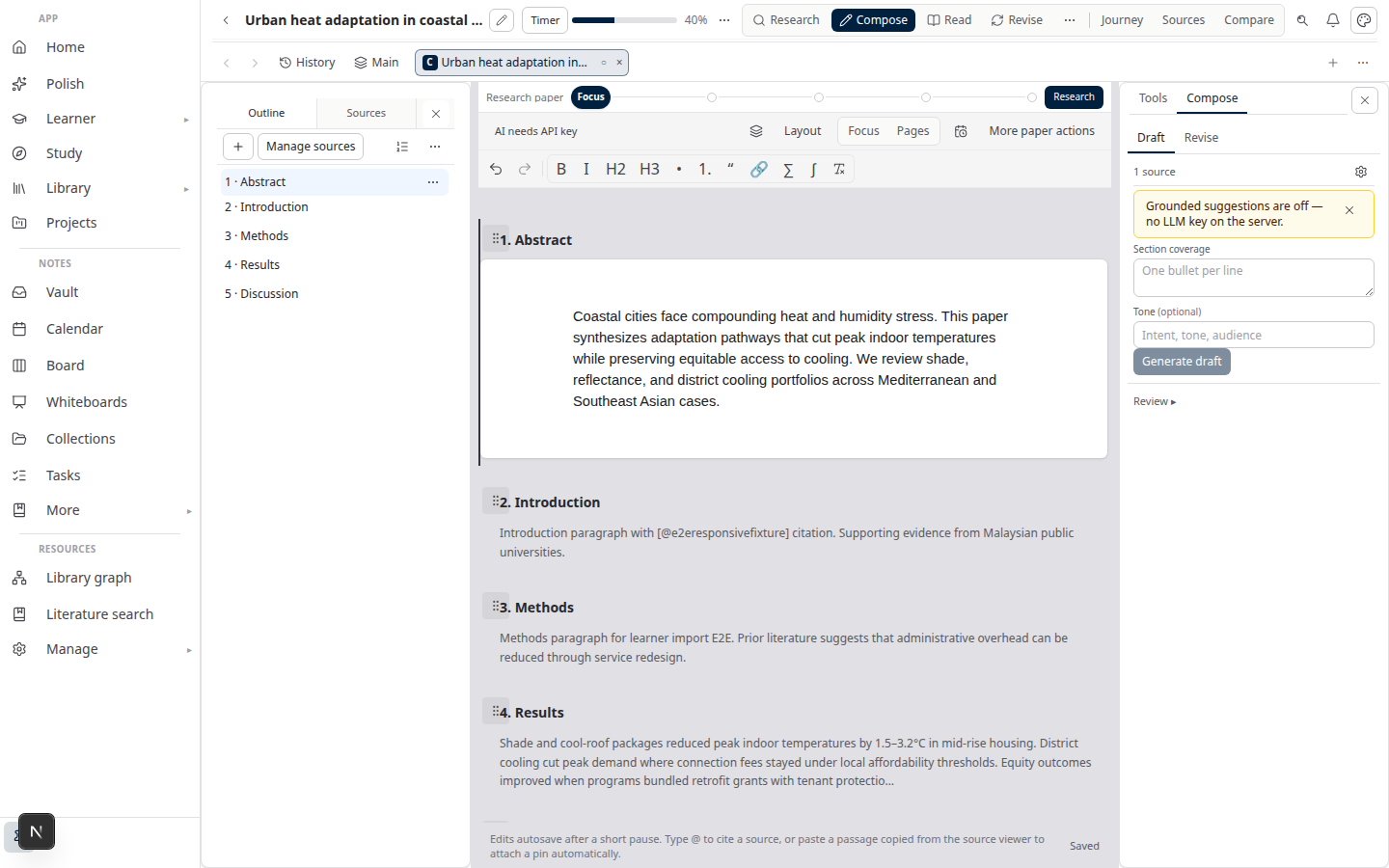
Lattuce Writer compose on lattuce.app

Quick comparison

PaperpileMendeleyLattuce
Core jobCloud reference manager (Docs-first)Reference manager + desktop PDF libraryResearch + writing at lattuce.app
CaptureBrowser extension, Drive-backed libraryBrowser, desktop, publisher pagesLibrary upload, catalog import, optional Zotero
Team librariesShared folders and team plansGroup librariesHousehold account — not a lab-wide ref manager
Word / Docs pluginsGoogle Docs + Word cite-while-you-writeWord cite-while-you-writeNo cite-in-Word plugin
WritingCite inside Docs or WordCite inside WordGrounded compose with cite chips
Literature synthesis——Research missions with reviewable evidence
Citation checksStyle and format in the pluginStyle and format in the pluginVerifier flags ungrounded claims
Word exportFrom the plugin in Docs or WordFrom the Word pluginSection approval → Word with references
ZoteroExport or import as neededExport or import as neededOptional Zotero import into your library
Where it runsBrowser + pluginsDesktop + web + Wordlattuce.app

When to use which

NeedUse
Daily capture and cite-while-you-write in Google DocsPaperpile
Cite-while-you-write in Word plus a desktop PDF libraryMendeley
A shared team library as the lab’s bibliography of recordPaperpile or Mendeley
Journal formatting via a Word or Docs pluginPaperpile or Mendeley
A cited literature review or thesis chapter from PDFs you keepLattuce
Research missions, then compose with citation checksLattuce
Approved Word export from a PDF library — not a plugin insertLattuce

A common stack: keep Paperpile or Mendeley as the inbox and team library. Upload those PDFs (or import via Zotero if that is your bridge) into Lattuce when the job is a defensible draft, not another bibliography card.

What Paperpile and Mendeley still win

They win the reference-management job. Lattuce does not try to take it.

Paperpile still wins when the lab lives in Google Docs:

  • Google Docs plugin — cite while you write without leaving the draft
  • Browser-first capture — one-click save from publisher pages into a clean cloud library
  • Team libraries — shared folders and permissions built for a reference group, not a manuscript workspace

Mendeley still wins when Word and a desktop library are the daily habit:

  • Word plugin — cite-while-you-write that many theses already depend on
  • Desktop PDF annotation — read and mark up offline, then sync the library
  • Group libraries — institutional and lab collections with a mature sharing model

Both still win plugin-first submission: pick a CSL or journal style in Word or Docs and generate the bibliography there. If that is the whole pipeline, you do not need Lattuce.

What Lattuce wins

Lattuce wins the writing pipeline after the library exists.

  • Grounded compose — draft against extracted PDF text, not metadata cards or chat memory. Citations are cite chips from attached library rows.
  • Research missions — literature discovery and synthesis with an evidence matrix you can review before anyone treats prose as final.
  • Citation checks — the verifier flags claims that are not grounded in attached sources, before you approve a section.
  • Word export from your PDF library — approve sections, then export DOCX with real references. Walk the path in Sources to DOCX in Lattuce.
  • Optional Zotero import — sync or rich-import metadata (and attachments when your account supports it) from Library → References. Lattuce does not replace Paperpile; Zotero is an optional bridge. See Lattuce + Zotero and Zotero to BibTeX in Lattuce.

Honest limits: Lattuce does not ship a Word or Google Docs cite plugin, and it does not replace team libraries. Keep Paperpile or Mendeley as the bibliography archive. There is no native Paperpile or Mendeley sync — upload PDFs, or import through Zotero when that is already in the stack. Citation write-back to Zotero is not shipped.

The full author path — attach sources, run a review mission, compose, approve, export Word — is in Literature review with Lattuce.

Bottom line

Keep Paperpile or Mendeley when the job is capture, team libraries, and cite-while-you-write in Word or Google Docs. Use Lattuce when those PDFs must become verified prose — grounded compose, missions, citation checks, and Word export from the library you keep. Do not rip out Paperpile. Add the writing pipeline beside it.

Related reading

  • Lattuce + Zotero
  • Zotero to BibTeX in Lattuce
  • Sources to DOCX in Lattuce
  • Literature review with Lattuce

Bahasa Melayu: Paperpile dan Mendeley vs Lattuce — pengurus rujukan atau talian paip penulisan?

PreviousChatGPT vs Lattuce for literature review — brainstorm or cited Word export?NextTypst.app and Overleaf vs Lattuce — typesetting clouds or grounded Word export?

Tool comparisons

  1. 1. Notion vs Lattuce — which research tool fits your workflow?
  2. 2. Using Lattuce alongside Notion
  3. 3. Lattuce vs research and team apps
  4. 4. Obsidian vs Lattuce — notes vault or full research workspace?
  5. 5. NotebookLM vs Lattuce — quick digest or full research workflow?
  6. 6. Heptabase vs Lattuce — visual thinking or cited academic writing?
  7. 7. Lattuce + Zotero — import, cite, and export without leaving your library
  8. 8. Fabric vs Lattuce — AI second brain or cited academic writing?
  9. 9. Overleaf vs Lattuce — LaTeX collaboration or grounded Word export pipeline?
  10. 10. Scrivener vs Lattuce — long-form structure vs research pipeline
  11. 11. Elicit and Consensus vs Lattuce — answer engines vs grounded research pipeline
  12. 12. AFFiNE vs Lattuce — doc-canvas fusion vs academic research layer
  13. 13. Logseq and Roam vs Lattuce — daily notes vs publish pipeline
  14. 14. Google Docs vs Lattuce — co-authored drafts vs citation-verified export
  15. 15. Elicit vs Lattuce — literature search or full research pipeline?
  16. 16. ChatGPT vs Lattuce for literature review — brainstorm or cited Word export?
  17. You are here17. Paperpile and Mendeley vs Lattuce — reference managers or writing pipeline?
  18. 18. Typst.app and Overleaf vs Lattuce — typesetting clouds or grounded Word export?
  19. 19. Consensus vs Lattuce — research Q&A search or cited writing pipeline?
  20. 20. Perplexity Academic vs Lattuce missions — web search chat or library-grounded synthesis?

On this page

  1. Quick comparison
  2. When to use which
  3. What Paperpile and Mendeley still win
  4. What Lattuce wins
  5. Bottom line
  6. Related reading

Explore Lattuce

Start writing, compare tools, or browse tutorials for your research stack.

Try LattuceTutorialsPlans

Subscribe to Tool comparisons: RSS · Atom

← All posts
TermsPrivacyCookiesRefundsFAQContact[email protected]

© Lattuce

Skip to content
Blog
  1. Blog
  2. /
  3. Tool comparisons
  4. /
  5. Paperpile and Mendeley vs Lattuce — reference managers or writing pipeline?

May 8, 2027 · Tool comparisons

Paperpile and Mendeley vs Lattuce — reference managers or writing pipeline?

Paperpile and Mendeley vs Lattuce for academic writing — keep the reference manager; use Lattuce for grounded compose, citation checks, and Word export.

  • comparison
  • paperpile
  • mendeley
  • citations
  • writer
  • seo
LanguageEnglishBahasa Melayu

Paperpile and Mendeley are reference managers — capture papers, organise team libraries, and cite in Word or Google Docs. Lattuce at lattuce.app is the research-and-writing layer where a PDF library becomes grounded drafts, citation checks, and approved Word exports.

The honest split: Paperpile and Mendeley manage references; Lattuce composes and publishes manuscripts tied to your sources. Keep the manager you already use. Lattuce is a complement stack, not a Paperpile replacement.

Lattuce Writer compose on lattuce.app

Quick comparison

PaperpileMendeleyLattuce
Core jobCloud reference manager (Docs-first)Reference manager + desktop PDF libraryResearch + writing at lattuce.app
CaptureBrowser extension, Drive-backed libraryBrowser, desktop, publisher pagesLibrary upload, catalog import, optional Zotero
Team librariesShared folders and team plansGroup librariesHousehold account — not a lab-wide ref manager
Word / Docs pluginsGoogle Docs + Word cite-while-you-writeWord cite-while-you-writeNo cite-in-Word plugin
WritingCite inside Docs or WordCite inside WordGrounded compose with cite chips
Literature synthesis——Research missions with reviewable evidence
Citation checksStyle and format in the pluginStyle and format in the pluginVerifier flags ungrounded claims
Word exportFrom the plugin in Docs or WordFrom the Word pluginSection approval → Word with references
ZoteroExport or import as neededExport or import as neededOptional Zotero import into your library
Where it runsBrowser + pluginsDesktop + web + Wordlattuce.app

When to use which

NeedUse
Daily capture and cite-while-you-write in Google DocsPaperpile
Cite-while-you-write in Word plus a desktop PDF libraryMendeley
A shared team library as the lab’s bibliography of recordPaperpile or Mendeley
Journal formatting via a Word or Docs pluginPaperpile or Mendeley
A cited literature review or thesis chapter from PDFs you keepLattuce
Research missions, then compose with citation checksLattuce
Approved Word export from a PDF library — not a plugin insertLattuce

A common stack: keep Paperpile or Mendeley as the inbox and team library. Upload those PDFs (or import via Zotero if that is your bridge) into Lattuce when the job is a defensible draft, not another bibliography card.

What Paperpile and Mendeley still win

They win the reference-management job. Lattuce does not try to take it.

Paperpile still wins when the lab lives in Google Docs:

  • Google Docs plugin — cite while you write without leaving the draft
  • Browser-first capture — one-click save from publisher pages into a clean cloud library
  • Team libraries — shared folders and permissions built for a reference group, not a manuscript workspace

Mendeley still wins when Word and a desktop library are the daily habit:

  • Word plugin — cite-while-you-write that many theses already depend on
  • Desktop PDF annotation — read and mark up offline, then sync the library
  • Group libraries — institutional and lab collections with a mature sharing model

Both still win plugin-first submission: pick a CSL or journal style in Word or Docs and generate the bibliography there. If that is the whole pipeline, you do not need Lattuce.

What Lattuce wins

Lattuce wins the writing pipeline after the library exists.

  • Grounded compose — draft against extracted PDF text, not metadata cards or chat memory. Citations are cite chips from attached library rows.
  • Research missions — literature discovery and synthesis with an evidence matrix you can review before anyone treats prose as final.
  • Citation checks — the verifier flags claims that are not grounded in attached sources, before you approve a section.
  • Word export from your PDF library — approve sections, then export DOCX with real references. Walk the path in Sources to DOCX in Lattuce.
  • Optional Zotero import — sync or rich-import metadata (and attachments when your account supports it) from Library → References. Lattuce does not replace Paperpile; Zotero is an optional bridge. See Lattuce + Zotero and Zotero to BibTeX in Lattuce.

Honest limits: Lattuce does not ship a Word or Google Docs cite plugin, and it does not replace team libraries. Keep Paperpile or Mendeley as the bibliography archive. There is no native Paperpile or Mendeley sync — upload PDFs, or import through Zotero when that is already in the stack. Citation write-back to Zotero is not shipped.

The full author path — attach sources, run a review mission, compose, approve, export Word — is in Literature review with Lattuce.

Bottom line

Keep Paperpile or Mendeley when the job is capture, team libraries, and cite-while-you-write in Word or Google Docs. Use Lattuce when those PDFs must become verified prose — grounded compose, missions, citation checks, and Word export from the library you keep. Do not rip out Paperpile. Add the writing pipeline beside it.

Related reading

  • Lattuce + Zotero
  • Zotero to BibTeX in Lattuce
  • Sources to DOCX in Lattuce
  • Literature review with Lattuce

Bahasa Melayu: Paperpile dan Mendeley vs Lattuce — pengurus rujukan atau talian paip penulisan?

PreviousChatGPT vs Lattuce for literature review — brainstorm or cited Word export?NextTypst.app and Overleaf vs Lattuce — typesetting clouds or grounded Word export?

Tool comparisons

  1. 1. Notion vs Lattuce — which research tool fits your workflow?
  2. 2. Using Lattuce alongside Notion
  3. 3. Lattuce vs research and team apps
  4. 4. Obsidian vs Lattuce — notes vault or full research workspace?
  5. 5. NotebookLM vs Lattuce — quick digest or full research workflow?
  6. 6. Heptabase vs Lattuce — visual thinking or cited academic writing?
  7. 7. Lattuce + Zotero — import, cite, and export without leaving your library
  8. 8. Fabric vs Lattuce — AI second brain or cited academic writing?
  9. 9. Overleaf vs Lattuce — LaTeX collaboration or grounded Word export pipeline?
  10. 10. Scrivener vs Lattuce — long-form structure vs research pipeline
  11. 11. Elicit and Consensus vs Lattuce — answer engines vs grounded research pipeline
  12. 12. AFFiNE vs Lattuce — doc-canvas fusion vs academic research layer
  13. 13. Logseq and Roam vs Lattuce — daily notes vs publish pipeline
  14. 14. Google Docs vs Lattuce — co-authored drafts vs citation-verified export
  15. 15. Elicit vs Lattuce — literature search or full research pipeline?
  16. 16. ChatGPT vs Lattuce for literature review — brainstorm or cited Word export?
  17. You are here17. Paperpile and Mendeley vs Lattuce — reference managers or writing pipeline?
  18. 18. Typst.app and Overleaf vs Lattuce — typesetting clouds or grounded Word export?
  19. 19. Consensus vs Lattuce — research Q&A search or cited writing pipeline?
  20. 20. Perplexity Academic vs Lattuce missions — web search chat or library-grounded synthesis?

On this page

  1. Quick comparison
  2. When to use which
  3. What Paperpile and Mendeley still win
  4. What Lattuce wins
  5. Bottom line
  6. Related reading

Explore Lattuce

Start writing, compare tools, or browse tutorials for your research stack.

Try LattuceTutorialsPlans

Subscribe to Tool comparisons: RSS · Atom

← All posts
TermsPrivacyCookiesRefundsFAQContact[email protected]

© Lattuce