Loading home
Loading home
Skip to content
Blog
  1. Blog
  2. /
  3. Tool comparisons
  4. /
  5. Lattuce + Zotero — import, cite, and export without leaving your library

October 24, 2026 · Tool comparisons

Lattuce + Zotero — import, cite, and export without leaving your library

Connect Zotero to Lattuce for rich metadata import, grounded citations in Writer, and BibTeX handoff — what Zotero still does best.

  • comparison
  • zotero
  • citations
  • writer
  • seo
LanguageEnglishBahasa Melayu

Zotero is the reference manager many researchers already trust — browser capture, group libraries, and CSL styles at scale. Lattuce at lattuce.app is the research-and-writing layer where those sources become grounded drafts, citation checks, and approved Word exports.

The honest split: Zotero collects and organises references; Lattuce composes and publishes manuscripts tied to your PDF library.
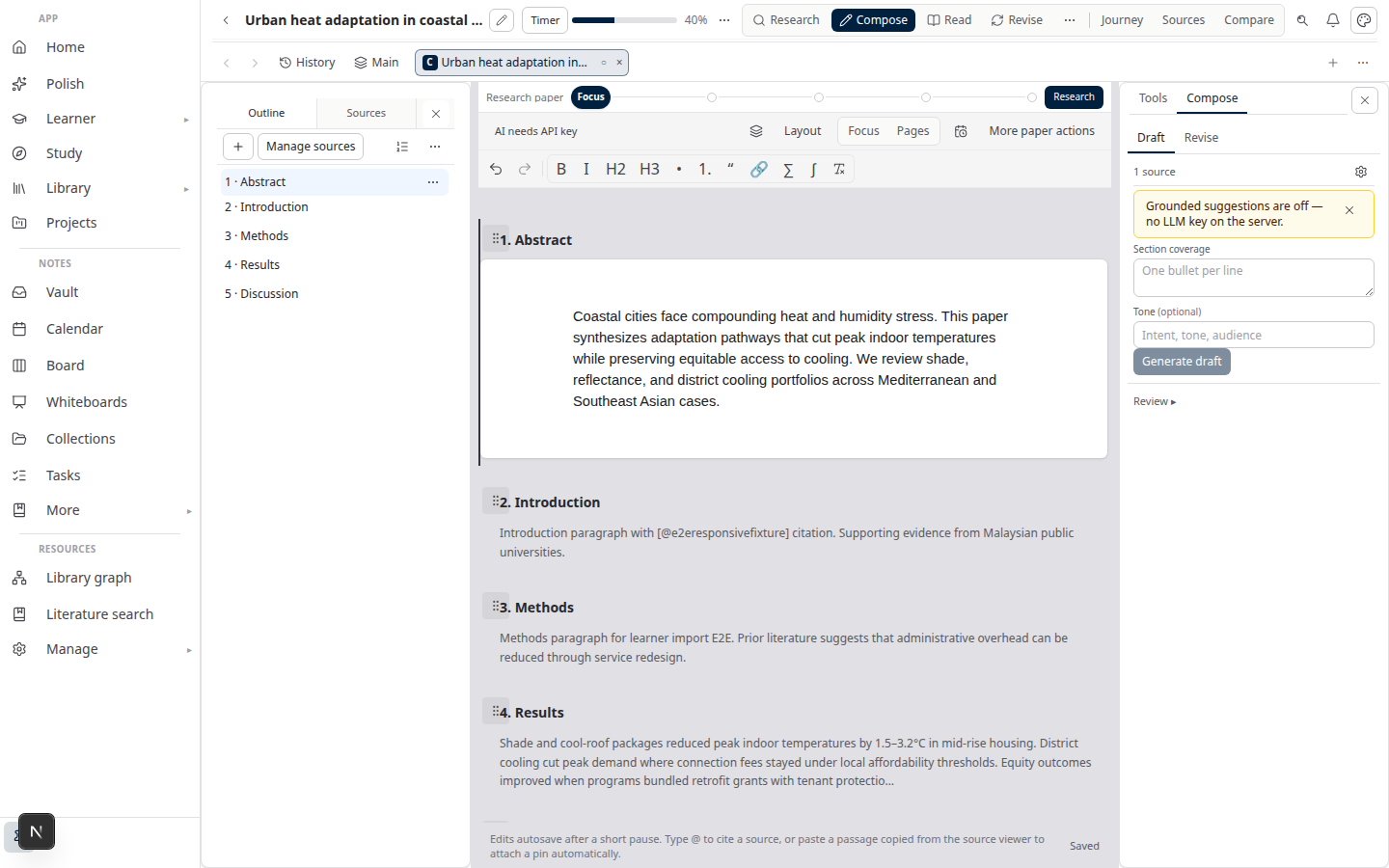
Lattuce Writer compose on lattuce.app

Quick comparison

ZoteroLattuce
Core jobReference manager + PDF storageResearch + writing at lattuce.app
CaptureBrowser connector, drag-and-dropLibrary upload, catalog import, Zotero sync
WritingWord/LaTeX pluginsWriter with citation verification
Literature synthesis—Research missions with evidence export
Word exportVia pluginsSection approval → Word with references
Translation—Collaborative translation linked to papers
Where it runsDesktop + zotero.org synclattuce.app

Zotero → Lattuce import path

  1. Sign in at lattuce.app.
  2. Open Library → References and expand the Zotero panel.
  3. Choose Sync for metadata-only import, or Rich import when your account supports PDF attachments and highlight metadata.
  4. Wait until imported rows show ready in the library.
  5. In a paper workspace, attach those sources from the left pane.

For a step-by-step BibTeX and export workflow, see Zotero to BibTeX in Lattuce.

Citing in Writer compose

Once sources are attached and ready:

  1. Open Compose or Write on your paper.
  2. Insert citations from attached library rows — Lattuce shows cite chips tied to real metadata.
  3. Run citation checks before you approve a section — the verifier flags claims that are not grounded in attached sources.

Lattuce does not invent references from chat memory. Citations come from your library, the same rows you imported from Zotero or uploaded directly.

Export and BibTeX handoff

DirectionWhat works today
Lattuce → WordApprove sections → export DOCX with formatted references
Lattuce → BibTeXDownload .bib from a completed literature review mission or research brief
Zotero ← LattuceOpt-in API write-back for bibliographic metadata; BibTeX export still available

If your lab still maintains the canonical Zotero group library, treat Lattuce as the drafting studio and Zotero as the bibliography archive you sync from exports.

What Zotero still wins

  • Browser connector — one-click capture from publisher pages
  • Group libraries — shared collections with mature permission models
  • CSL style gallery — thousands of journal-specific citation formats out of the box
  • Offline desktop app — full library access without a browser tab
  • Word and LibreOffice plugins — when your pipeline is plugin-first, not mission-first

What Lattuce adds

  • PDF grounding — ask and compose against extracted text, not just metadata cards
  • Research missions — literature discovery and synthesis with reviewable evidence matrices
  • Section approval — export integrity before Word leaves your account
  • Study and notes — whiteboards, digests, and vault graph beside the manuscript
  • Collaborative translation — bilingual papers linked to Writer, not a separate CAT tool
  • Household account — shared research workspace at lattuce.app with optional your own AI keys

When to use both

Use Zotero when…Use Lattuce when…
You capture papers daily from the webYou need a cited literature review or thesis chapter
Your lab shares one canonical reference groupYou run missions, compose, and export Word from sources
Journal submission needs a specific CSL style via Word pluginYou want citation verification before export

Bottom line

Keep Zotero as your reference inbox and group library. Use Lattuce when those PDFs must become verified prose — missions, compose, approval, Word, and optional translation on one account.

See also: Literature review with Lattuce · Zotero to BibTeX in Lattuce

Bahasa Melayu: Lattuce + Zotero — import, sitasi, dan eksport tanpa meninggalkan perpustakaan anda

PreviousHeptabase vs Lattuce — visual thinking or cited academic writing?NextFabric vs Lattuce — AI second brain or cited academic writing?

Tool comparisons

  1. 1. Notion vs Lattuce — which research tool fits your workflow?
  2. 2. Using Lattuce alongside Notion
  3. 3. Lattuce vs research and team apps
  4. 4. Obsidian vs Lattuce — notes vault or full research workspace?
  5. 5. NotebookLM vs Lattuce — quick digest or full research workflow?
  6. 6. Heptabase vs Lattuce — visual thinking or cited academic writing?
  7. You are here7. Lattuce + Zotero — import, cite, and export without leaving your library
  8. 8. Fabric vs Lattuce — AI second brain or cited academic writing?
  9. 9. Overleaf vs Lattuce — LaTeX collaboration or grounded Word export pipeline?
  10. 10. Scrivener vs Lattuce — long-form structure vs research pipeline
  11. 11. Elicit and Consensus vs Lattuce — answer engines vs grounded research pipeline
  12. 12. AFFiNE vs Lattuce — doc-canvas fusion vs academic research layer
  13. 13. Logseq and Roam vs Lattuce — daily notes vs publish pipeline
  14. 14. Google Docs vs Lattuce — co-authored drafts vs citation-verified export
  15. 15. Elicit vs Lattuce — literature search or full research pipeline?
  16. 16. ChatGPT vs Lattuce for literature review — brainstorm or cited Word export?
  17. 17. Paperpile and Mendeley vs Lattuce — reference managers or writing pipeline?
  18. 18. Typst.app and Overleaf vs Lattuce — typesetting clouds or grounded Word export?
  19. 19. Consensus vs Lattuce — research Q&A search or cited writing pipeline?
  20. 20. Perplexity Academic vs Lattuce missions — web search chat or library-grounded synthesis?

On this page

  1. Quick comparison
  2. Zotero → Lattuce import path
  3. Citing in Writer compose
  4. Export and BibTeX handoff
  5. What Zotero still wins
  6. What Lattuce adds
  7. When to use both
  8. Bottom line

Explore Lattuce

Start writing, compare tools, or browse tutorials for your research stack.

Try LattuceTutorialsPlans

Subscribe to Tool comparisons: RSS · Atom

← All posts
TermsPrivacyCookiesRefundsFAQContact[email protected]

© Lattuce

Skip to content
Blog
  1. Blog
  2. /
  3. Tool comparisons
  4. /
  5. Lattuce + Zotero — import, cite, and export without leaving your library

October 24, 2026 · Tool comparisons

Lattuce + Zotero — import, cite, and export without leaving your library

Connect Zotero to Lattuce for rich metadata import, grounded citations in Writer, and BibTeX handoff — what Zotero still does best.

  • comparison
  • zotero
  • citations
  • writer
  • seo
LanguageEnglishBahasa Melayu

Zotero is the reference manager many researchers already trust — browser capture, group libraries, and CSL styles at scale. Lattuce at lattuce.app is the research-and-writing layer where those sources become grounded drafts, citation checks, and approved Word exports.

The honest split: Zotero collects and organises references; Lattuce composes and publishes manuscripts tied to your PDF library.

Lattuce Writer compose on lattuce.app

Quick comparison

ZoteroLattuce
Core jobReference manager + PDF storageResearch + writing at lattuce.app
CaptureBrowser connector, drag-and-dropLibrary upload, catalog import, Zotero sync
WritingWord/LaTeX pluginsWriter with citation verification
Literature synthesis—Research missions with evidence export
Word exportVia pluginsSection approval → Word with references
Translation—Collaborative translation linked to papers
Where it runsDesktop + zotero.org synclattuce.app

Zotero → Lattuce import path

  1. Sign in at lattuce.app.
  2. Open Library → References and expand the Zotero panel.
  3. Choose Sync for metadata-only import, or Rich import when your account supports PDF attachments and highlight metadata.
  4. Wait until imported rows show ready in the library.
  5. In a paper workspace, attach those sources from the left pane.

For a step-by-step BibTeX and export workflow, see Zotero to BibTeX in Lattuce.

Citing in Writer compose

Once sources are attached and ready:

  1. Open Compose or Write on your paper.
  2. Insert citations from attached library rows — Lattuce shows cite chips tied to real metadata.
  3. Run citation checks before you approve a section — the verifier flags claims that are not grounded in attached sources.

Lattuce does not invent references from chat memory. Citations come from your library, the same rows you imported from Zotero or uploaded directly.

Export and BibTeX handoff

DirectionWhat works today
Lattuce → WordApprove sections → export DOCX with formatted references
Lattuce → BibTeXDownload .bib from a completed literature review mission or research brief
Zotero ← LattuceOpt-in API write-back for bibliographic metadata; BibTeX export still available

If your lab still maintains the canonical Zotero group library, treat Lattuce as the drafting studio and Zotero as the bibliography archive you sync from exports.

What Zotero still wins

  • Browser connector — one-click capture from publisher pages
  • Group libraries — shared collections with mature permission models
  • CSL style gallery — thousands of journal-specific citation formats out of the box
  • Offline desktop app — full library access without a browser tab
  • Word and LibreOffice plugins — when your pipeline is plugin-first, not mission-first

What Lattuce adds

  • PDF grounding — ask and compose against extracted text, not just metadata cards
  • Research missions — literature discovery and synthesis with reviewable evidence matrices
  • Section approval — export integrity before Word leaves your account
  • Study and notes — whiteboards, digests, and vault graph beside the manuscript
  • Collaborative translation — bilingual papers linked to Writer, not a separate CAT tool
  • Household account — shared research workspace at lattuce.app with optional your own AI keys

When to use both

Use Zotero when…Use Lattuce when…
You capture papers daily from the webYou need a cited literature review or thesis chapter
Your lab shares one canonical reference groupYou run missions, compose, and export Word from sources
Journal submission needs a specific CSL style via Word pluginYou want citation verification before export

Bottom line

Keep Zotero as your reference inbox and group library. Use Lattuce when those PDFs must become verified prose — missions, compose, approval, Word, and optional translation on one account.

See also: Literature review with Lattuce · Zotero to BibTeX in Lattuce

Bahasa Melayu: Lattuce + Zotero — import, sitasi, dan eksport tanpa meninggalkan perpustakaan anda

PreviousHeptabase vs Lattuce — visual thinking or cited academic writing?NextFabric vs Lattuce — AI second brain or cited academic writing?

Tool comparisons

  1. 1. Notion vs Lattuce — which research tool fits your workflow?
  2. 2. Using Lattuce alongside Notion
  3. 3. Lattuce vs research and team apps
  4. 4. Obsidian vs Lattuce — notes vault or full research workspace?
  5. 5. NotebookLM vs Lattuce — quick digest or full research workflow?
  6. 6. Heptabase vs Lattuce — visual thinking or cited academic writing?
  7. You are here7. Lattuce + Zotero — import, cite, and export without leaving your library
  8. 8. Fabric vs Lattuce — AI second brain or cited academic writing?
  9. 9. Overleaf vs Lattuce — LaTeX collaboration or grounded Word export pipeline?
  10. 10. Scrivener vs Lattuce — long-form structure vs research pipeline
  11. 11. Elicit and Consensus vs Lattuce — answer engines vs grounded research pipeline
  12. 12. AFFiNE vs Lattuce — doc-canvas fusion vs academic research layer
  13. 13. Logseq and Roam vs Lattuce — daily notes vs publish pipeline
  14. 14. Google Docs vs Lattuce — co-authored drafts vs citation-verified export
  15. 15. Elicit vs Lattuce — literature search or full research pipeline?
  16. 16. ChatGPT vs Lattuce for literature review — brainstorm or cited Word export?
  17. 17. Paperpile and Mendeley vs Lattuce — reference managers or writing pipeline?
  18. 18. Typst.app and Overleaf vs Lattuce — typesetting clouds or grounded Word export?
  19. 19. Consensus vs Lattuce — research Q&A search or cited writing pipeline?
  20. 20. Perplexity Academic vs Lattuce missions — web search chat or library-grounded synthesis?

On this page

  1. Quick comparison
  2. Zotero → Lattuce import path
  3. Citing in Writer compose
  4. Export and BibTeX handoff
  5. What Zotero still wins
  6. What Lattuce adds
  7. When to use both
  8. Bottom line

Explore Lattuce

Start writing, compare tools, or browse tutorials for your research stack.

Try LattuceTutorialsPlans

Subscribe to Tool comparisons: RSS · Atom

← All posts
TermsPrivacyCookiesRefundsFAQContact[email protected]

© Lattuce