Loading home
Loading home
Skip to content
Blog
  1. Blog
  2. /
  3. Tool comparisons
  4. /
  5. Scrivener vs Lattuce — long-form structure vs research pipeline

November 7, 2026 · Tool comparisons

Scrivener vs Lattuce — long-form structure vs research pipeline

Scrivener excels at binder and compile; Lattuce adds PDF grounding, citation-verified compose, and Word export for theses and long papers.

  • comparison
  • scrivener
  • thesis
  • writer
  • seo

Scrivener is the reference tool for structuring long manuscripts — binder, corkboard, synopses, snapshots, compile presets, and a writing rhythm tuned for novels, theses, and screenplays. Lattuce (lattuce.app) is a cloud research-and-writing platform that borrows several of those planning ideas while connecting them to PDF sources, citation-verified compose, and export gates your lab or household can review.

Many graduate students start in Scrivener for chapter structure, then hit friction when literature lives in Zotero, citations must survive export, or a co-supervised thesis needs bilingual translation. Lattuce targets that handoff: keep the sectioned manuscript mental model, add the research pipeline at lattuce.app.
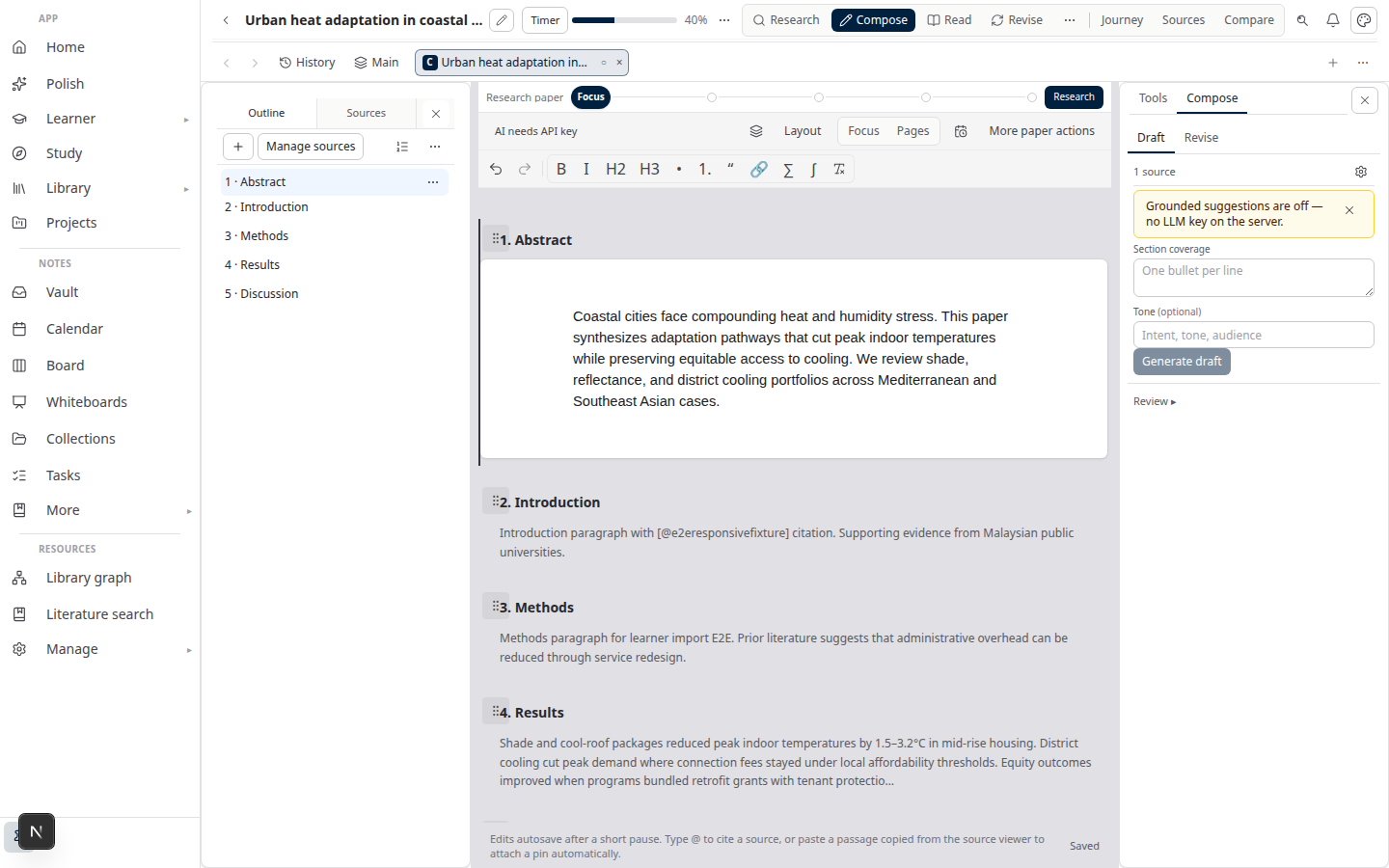
Lattuce Writer compose on lattuce.app

In short: choose Scrivener when binder UX and offline compile are the whole job; choose Lattuce when the manuscript must stay tied to sources, missions, and verified citations through DOCX (and optional EPUB) export.

Quick comparison

ScrivenerLattuce (Writer)
Core jobLong-form drafting + compileCloud research + cited academic writing
StructureBinder, corkboard, outliner, labelsOutline, corkboard, document view, section synopses & label colours
DraftingRich-text sections, typewriter modeSection editor with focus/simple write, typewriter scroll, writing targets
VersionsSnapshots per documentSection snapshots with labels + version history
TemplatesBuilt-in & user compile formatsPaper outline templates (IMRaD, thesis chapters, systematic review)
Import / exportCompile to many formats (strong on fiction)DOCX, LaTeX/Typst/PDF, EPUB/MOBI/RTF; Scrivener project import
Sources & citationsResearch folder (files); limited citation enginePDF library, highlights, missions, citation-verified compose
CollaborationSync / Dropbox-style sharingHousehold-scoped; approval gates — not org-wide Google Docs co-edit
HostingDesktop app (macOS/Windows)Browser at lattuce.app; Windows/Android apps with optional offline vault
TranslationNot a focusWeblate workflow for EN↔MS when you need it

When Scrivener fits

  • You are writing a novel or screenplay and want mature compile presets, script formats, and decades of community recipes.
  • Offline-first desktop is non-negotiable — you draft on a plane with no server dependency.
  • Your workflow ends at Compile into Word or ebook formats; you do not need PDF grounding or a shared source library.
  • You rely on Scrivener’s binder depth — nested folders, document notes, and split views that Lattuce deliberately does not clone one-for-one.

When Lattuce fits

  • The manuscript is research-backed — journal article, thesis, or systematic review where every claim should trace to a PDF in your library.
  • You want section approval → DOCX export instead of “compile and hope citations survived.”
  • Your lab or household needs shared cloud workspaces with optional BYOK for AI-assisted compose and study.
  • You run research missions (evidence export, brainstorm briefs) and want those outputs to land in the same paper outline.
  • You need multilingual workflows — e.g. Malay abstract alongside English body — without maintaining two Scrivener projects by hand.
  • You are migrating from Scrivener and want binder sections, synopses, and body text imported into Lattuce sections (upload a .scriv zip from Writer).

What Scrivener still wins

  • Binder UX depth — drag-and-drop hierarchy, split editor, and decades of muscle memory for fiction writers.
  • Compile engine — one-click multi-format output, custom compile formats, and screenplay-specific tooling.
  • Offline desktop maturity — no server, no deploy; install and write.
  • Ecosystem & tutorials — courses, forums, and templates aimed squarely at novelists and NaNoWriMo cadence.
  • Screenplay & Final Draft parity — not a goal for Lattuce Writer.

What Lattuce wins

  • Integrated source library — upload PDFs and URLs, highlight, and cite without a plugin stack.
  • Grounded compose — AI suggestions constrained to your corpus, with a grounding verifier before export.
  • Section approval gate — mark sections approved before DOCX leaves the house; reduces “mystery formatting” surprises.
  • Research missions — structured evidence gathering that feeds Writer, not a side folder of loose notes.
  • Academic outline templates — IMRaD, five-chapter thesis, systematic review skeletons with planner synopses on the corkboard.
  • Scrivener import — bring an existing .scriv project into Lattuce sections (synopsis + body text); replace or merge outlines from the Writer UI.
  • Household cloud account — papers, sources, and history on your Lattuce account at lattuce.app.
  • Study & Learner — grounded chat, digest artifacts, and language-learning paths over the same corpus (Scrivener has no equivalent).

Workflow: Scrivener → Lattuce

A practical migration path for thesis writers:

  1. Finish structure in Scrivener (or export early) — corkboard order and synopses travel well.
  2. Import the .scriv zip in Lattuce Writer — sections, synopses, and draft text become paper sections.
  3. Attach sources in Library — PDFs, Zotero metadata (rich import when configured), or mission outputs.
  4. Draft with citation-verified compose — section editor, writing targets, snapshots for risky rewrites.
  5. Approve sections — gate export until supervisors sign off on each chapter.
  6. Export DOCX (or EPUB for preprints) — citations tied to the source library, not orphaned footnotes.

You can also run both: Scrivener for early exploratory drafting on a laptop, Lattuce for the supervised, cited, exportable pipeline at lattuce.app.

Writer features Scrivener users will recognise

Lattuce Writer deliberately closes common “why not just use Scrivener?” gaps for academic long-form work — without pretending to be a novelist’s compile studio:

Scrivener ideaLattuce Writer
Corkboard index cardsCorkboard view with label colours and synopses
Inspector notesSection inspector (synopsis, label, quick snapshot)
Project targetsPaper target + per-browser-session word target
SnapshotsNamed section snapshots in version history
Outline templatesIMRaD, thesis, systematic review seed templates
CompileExport bar + compile presets (journal DOCX, preprint PDF, ebook EPUB/MOBI)
Focus / typewriterSimple write mode with typewriter scroll
—Scrivener .scriv import

Fair limits: MOBI export on the server needs Calibre (ebook-convert); offline Writer in the notes-shell app is read/cache-first, not a full Scrivener-style offline write queue; realtime co-edit on paper sections is household-scoped and opt-in, not org-wide.

Bottom line

Scrivener remains the best-in-class structure and compile environment for long creative manuscripts on the desktop. Lattuce is the better fit when the manuscript is part of a research pipeline — sources, missions, verified citations, approval, and export at lattuce.app — and when you want Scrivener-like planning tools without giving up PDF grounding.

If you already live in Scrivener, treat Lattuce as the downstream publishing layer, not a binder replacement. If you are starting a cited thesis or lab paper today, starting in Lattuce avoids the Scrivener → Word → citation-fix loop entirely.

Related reading

  • Literature review with Lattuce
  • Sources to DOCX in Lattuce
  • Lattuce vs research and team apps
  • Approval gates vs realtime co-edit
  • Where you can use Lattuce today
PreviousOverleaf vs Lattuce — LaTeX collaboration or grounded Word export pipeline?NextElicit and Consensus vs Lattuce — answer engines vs grounded research pipeline

Tool comparisons

  1. 1. Notion vs Lattuce — which research tool fits your workflow?
  2. 2. Using Lattuce alongside Notion
  3. 3. Lattuce vs research and team apps
  4. 4. Obsidian vs Lattuce — notes vault or full research workspace?
  5. 5. NotebookLM vs Lattuce — quick digest or full research workflow?
  6. 6. Heptabase vs Lattuce — visual thinking or cited academic writing?
  7. 7. Lattuce + Zotero — import, cite, and export without leaving your library
  8. 8. Fabric vs Lattuce — AI second brain or cited academic writing?
  9. 9. Overleaf vs Lattuce — LaTeX collaboration or grounded Word export pipeline?
  10. You are here10. Scrivener vs Lattuce — long-form structure vs research pipeline
  11. 11. Elicit and Consensus vs Lattuce — answer engines vs grounded research pipeline
  12. 12. AFFiNE vs Lattuce — doc-canvas fusion vs academic research layer
  13. 13. Logseq and Roam vs Lattuce — daily notes vs publish pipeline
  14. 14. Google Docs vs Lattuce — co-authored drafts vs citation-verified export
  15. 15. Elicit vs Lattuce — literature search or full research pipeline?
  16. 16. ChatGPT vs Lattuce for literature review — brainstorm or cited Word export?
  17. 17. Paperpile and Mendeley vs Lattuce — reference managers or writing pipeline?
  18. 18. Typst.app and Overleaf vs Lattuce — typesetting clouds or grounded Word export?
  19. 19. Consensus vs Lattuce — research Q&A search or cited writing pipeline?
  20. 20. Perplexity Academic vs Lattuce missions — web search chat or library-grounded synthesis?

On this page

  1. Quick comparison
  2. When Scrivener fits
  3. When Lattuce fits
  4. What Scrivener still wins
  5. What Lattuce wins
  6. Workflow: Scrivener → Lattuce
  7. Writer features Scrivener users will recognise
  8. Bottom line
  9. Related reading

Explore Lattuce

Start writing, compare tools, or browse tutorials for your research stack.

Try LattuceTutorialsPlans

Subscribe to Tool comparisons: RSS · Atom

← All posts
TermsPrivacyCookiesRefundsFAQContact[email protected]

© Lattuce

Skip to content
Blog
  1. Blog
  2. /
  3. Tool comparisons
  4. /
  5. Scrivener vs Lattuce — long-form structure vs research pipeline

November 7, 2026 · Tool comparisons

Scrivener vs Lattuce — long-form structure vs research pipeline

Scrivener excels at binder and compile; Lattuce adds PDF grounding, citation-verified compose, and Word export for theses and long papers.

  • comparison
  • scrivener
  • thesis
  • writer
  • seo

Scrivener is the reference tool for structuring long manuscripts — binder, corkboard, synopses, snapshots, compile presets, and a writing rhythm tuned for novels, theses, and screenplays. Lattuce (lattuce.app) is a cloud research-and-writing platform that borrows several of those planning ideas while connecting them to PDF sources, citation-verified compose, and export gates your lab or household can review.

Many graduate students start in Scrivener for chapter structure, then hit friction when literature lives in Zotero, citations must survive export, or a co-supervised thesis needs bilingual translation. Lattuce targets that handoff: keep the sectioned manuscript mental model, add the research pipeline at lattuce.app.

Lattuce Writer compose on lattuce.app

In short: choose Scrivener when binder UX and offline compile are the whole job; choose Lattuce when the manuscript must stay tied to sources, missions, and verified citations through DOCX (and optional EPUB) export.

Quick comparison

ScrivenerLattuce (Writer)
Core jobLong-form drafting + compileCloud research + cited academic writing
StructureBinder, corkboard, outliner, labelsOutline, corkboard, document view, section synopses & label colours
DraftingRich-text sections, typewriter modeSection editor with focus/simple write, typewriter scroll, writing targets
VersionsSnapshots per documentSection snapshots with labels + version history
TemplatesBuilt-in & user compile formatsPaper outline templates (IMRaD, thesis chapters, systematic review)
Import / exportCompile to many formats (strong on fiction)DOCX, LaTeX/Typst/PDF, EPUB/MOBI/RTF; Scrivener project import
Sources & citationsResearch folder (files); limited citation enginePDF library, highlights, missions, citation-verified compose
CollaborationSync / Dropbox-style sharingHousehold-scoped; approval gates — not org-wide Google Docs co-edit
HostingDesktop app (macOS/Windows)Browser at lattuce.app; Windows/Android apps with optional offline vault
TranslationNot a focusWeblate workflow for EN↔MS when you need it

When Scrivener fits

  • You are writing a novel or screenplay and want mature compile presets, script formats, and decades of community recipes.
  • Offline-first desktop is non-negotiable — you draft on a plane with no server dependency.
  • Your workflow ends at Compile into Word or ebook formats; you do not need PDF grounding or a shared source library.
  • You rely on Scrivener’s binder depth — nested folders, document notes, and split views that Lattuce deliberately does not clone one-for-one.

When Lattuce fits

  • The manuscript is research-backed — journal article, thesis, or systematic review where every claim should trace to a PDF in your library.
  • You want section approval → DOCX export instead of “compile and hope citations survived.”
  • Your lab or household needs shared cloud workspaces with optional BYOK for AI-assisted compose and study.
  • You run research missions (evidence export, brainstorm briefs) and want those outputs to land in the same paper outline.
  • You need multilingual workflows — e.g. Malay abstract alongside English body — without maintaining two Scrivener projects by hand.
  • You are migrating from Scrivener and want binder sections, synopses, and body text imported into Lattuce sections (upload a .scriv zip from Writer).

What Scrivener still wins

  • Binder UX depth — drag-and-drop hierarchy, split editor, and decades of muscle memory for fiction writers.
  • Compile engine — one-click multi-format output, custom compile formats, and screenplay-specific tooling.
  • Offline desktop maturity — no server, no deploy; install and write.
  • Ecosystem & tutorials — courses, forums, and templates aimed squarely at novelists and NaNoWriMo cadence.
  • Screenplay & Final Draft parity — not a goal for Lattuce Writer.

What Lattuce wins

  • Integrated source library — upload PDFs and URLs, highlight, and cite without a plugin stack.
  • Grounded compose — AI suggestions constrained to your corpus, with a grounding verifier before export.
  • Section approval gate — mark sections approved before DOCX leaves the house; reduces “mystery formatting” surprises.
  • Research missions — structured evidence gathering that feeds Writer, not a side folder of loose notes.
  • Academic outline templates — IMRaD, five-chapter thesis, systematic review skeletons with planner synopses on the corkboard.
  • Scrivener import — bring an existing .scriv project into Lattuce sections (synopsis + body text); replace or merge outlines from the Writer UI.
  • Household cloud account — papers, sources, and history on your Lattuce account at lattuce.app.
  • Study & Learner — grounded chat, digest artifacts, and language-learning paths over the same corpus (Scrivener has no equivalent).

Workflow: Scrivener → Lattuce

A practical migration path for thesis writers:

  1. Finish structure in Scrivener (or export early) — corkboard order and synopses travel well.
  2. Import the .scriv zip in Lattuce Writer — sections, synopses, and draft text become paper sections.
  3. Attach sources in Library — PDFs, Zotero metadata (rich import when configured), or mission outputs.
  4. Draft with citation-verified compose — section editor, writing targets, snapshots for risky rewrites.
  5. Approve sections — gate export until supervisors sign off on each chapter.
  6. Export DOCX (or EPUB for preprints) — citations tied to the source library, not orphaned footnotes.

You can also run both: Scrivener for early exploratory drafting on a laptop, Lattuce for the supervised, cited, exportable pipeline at lattuce.app.

Writer features Scrivener users will recognise

Lattuce Writer deliberately closes common “why not just use Scrivener?” gaps for academic long-form work — without pretending to be a novelist’s compile studio:

Scrivener ideaLattuce Writer
Corkboard index cardsCorkboard view with label colours and synopses
Inspector notesSection inspector (synopsis, label, quick snapshot)
Project targetsPaper target + per-browser-session word target
SnapshotsNamed section snapshots in version history
Outline templatesIMRaD, thesis, systematic review seed templates
CompileExport bar + compile presets (journal DOCX, preprint PDF, ebook EPUB/MOBI)
Focus / typewriterSimple write mode with typewriter scroll
—Scrivener .scriv import

Fair limits: MOBI export on the server needs Calibre (ebook-convert); offline Writer in the notes-shell app is read/cache-first, not a full Scrivener-style offline write queue; realtime co-edit on paper sections is household-scoped and opt-in, not org-wide.

Bottom line

Scrivener remains the best-in-class structure and compile environment for long creative manuscripts on the desktop. Lattuce is the better fit when the manuscript is part of a research pipeline — sources, missions, verified citations, approval, and export at lattuce.app — and when you want Scrivener-like planning tools without giving up PDF grounding.

If you already live in Scrivener, treat Lattuce as the downstream publishing layer, not a binder replacement. If you are starting a cited thesis or lab paper today, starting in Lattuce avoids the Scrivener → Word → citation-fix loop entirely.

Related reading

  • Literature review with Lattuce
  • Sources to DOCX in Lattuce
  • Lattuce vs research and team apps
  • Approval gates vs realtime co-edit
  • Where you can use Lattuce today
PreviousOverleaf vs Lattuce — LaTeX collaboration or grounded Word export pipeline?NextElicit and Consensus vs Lattuce — answer engines vs grounded research pipeline

Tool comparisons

  1. 1. Notion vs Lattuce — which research tool fits your workflow?
  2. 2. Using Lattuce alongside Notion
  3. 3. Lattuce vs research and team apps
  4. 4. Obsidian vs Lattuce — notes vault or full research workspace?
  5. 5. NotebookLM vs Lattuce — quick digest or full research workflow?
  6. 6. Heptabase vs Lattuce — visual thinking or cited academic writing?
  7. 7. Lattuce + Zotero — import, cite, and export without leaving your library
  8. 8. Fabric vs Lattuce — AI second brain or cited academic writing?
  9. 9. Overleaf vs Lattuce — LaTeX collaboration or grounded Word export pipeline?
  10. You are here10. Scrivener vs Lattuce — long-form structure vs research pipeline
  11. 11. Elicit and Consensus vs Lattuce — answer engines vs grounded research pipeline
  12. 12. AFFiNE vs Lattuce — doc-canvas fusion vs academic research layer
  13. 13. Logseq and Roam vs Lattuce — daily notes vs publish pipeline
  14. 14. Google Docs vs Lattuce — co-authored drafts vs citation-verified export
  15. 15. Elicit vs Lattuce — literature search or full research pipeline?
  16. 16. ChatGPT vs Lattuce for literature review — brainstorm or cited Word export?
  17. 17. Paperpile and Mendeley vs Lattuce — reference managers or writing pipeline?
  18. 18. Typst.app and Overleaf vs Lattuce — typesetting clouds or grounded Word export?
  19. 19. Consensus vs Lattuce — research Q&A search or cited writing pipeline?
  20. 20. Perplexity Academic vs Lattuce missions — web search chat or library-grounded synthesis?

On this page

  1. Quick comparison
  2. When Scrivener fits
  3. When Lattuce fits
  4. What Scrivener still wins
  5. What Lattuce wins
  6. Workflow: Scrivener → Lattuce
  7. Writer features Scrivener users will recognise
  8. Bottom line
  9. Related reading

Explore Lattuce

Start writing, compare tools, or browse tutorials for your research stack.

Try LattuceTutorialsPlans

Subscribe to Tool comparisons: RSS · Atom

← All posts
TermsPrivacyCookiesRefundsFAQContact[email protected]

© Lattuce