Loading home
Loading home
Skip to content
Blog
  1. Blog
  2. /
  3. Language learning
  4. /
  5. Learn from YouTube captions with Lattuce Learner

September 15, 2026 · Language learning

Learn from YouTube captions with Lattuce Learner

Import YouTube videos with captions into Lattuce Learner — subtitle cloze, tap-to-define vocabulary, and review on lingo.lattuce.app.

  • guide
  • learner
  • lingo
  • youtube
  • import
  • language-learning
  • seo
LanguageEnglishBahasa Melayu

You already watch foreign-language videos — news clips, lectures, drama. Lattuce Learner at lingo.lattuce.app turns those captions into study text: read line by line, tap words you do not know, and send them to Review.

For the full import menu, see How to import articles and books.
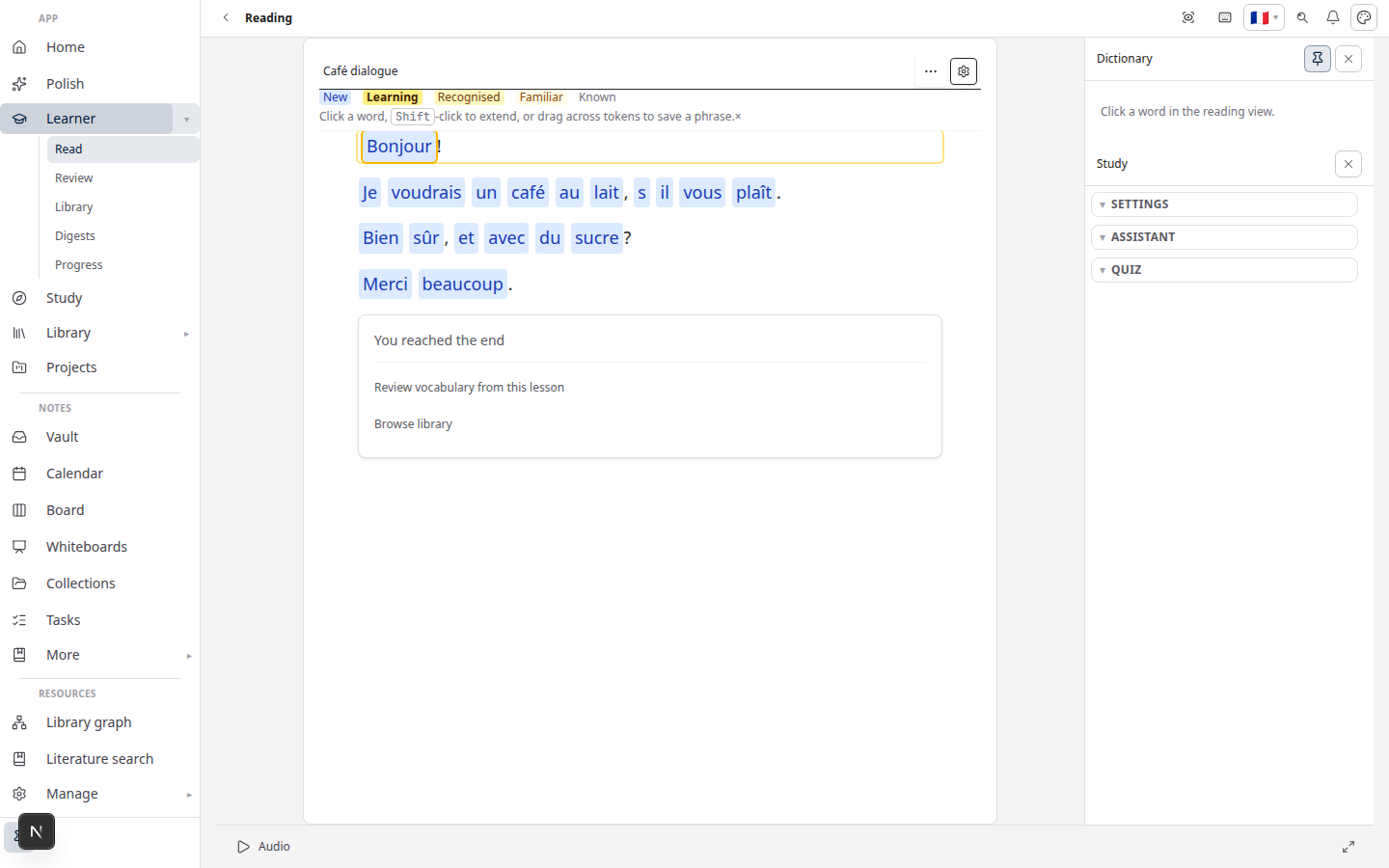
Lattuce Learner — read with word help and vocabulary review

Who this is for

YouGoal
Language studentStudy from a teacher’s YouTube playlist
News readerPractice Malay or Arabic from daily clips
Bilingual parentImport kids’ shows with subtitles for shared vocabulary

Not for exam prep over course PDFs — that is Study (Study vs Learner).

Before you start

You needNotes
Learn accesslingo.lattuce.app or Learn on your Lattuce account
A YouTube URLVideo or playlist with captions in your target language
NetworkImport and cloze generation require a connection

Videos without captions produce thin lessons — pick uploads that already have human or auto subtitles.

Import a single video

  1. Open Learn → Import → YouTube.
  2. Paste the video URL.
  3. Choose the caption language (target language you are learning).
  4. Wait for import — Lattuce pulls caption lines into the reader.
  5. Read; tap unfamiliar words to save them to Vocabulary.

Subtitle cloze mode

After import, open Cloze (when available for the lesson):

  • Key words are blanked in caption lines.
  • Fill from memory before revealing the answer.
  • Cloze pairs well with short news clips — one segment per line.

Cloze generation runs online; offline reading may show imported text without new cloze cards until you reconnect.

Playlists and channels

For a series of episodes:

  1. Import → YouTube with a playlist URL when supported.
  2. Each video becomes a lesson on your shelf.
  3. Review vocabulary across episodes in the shared Review queue.

Large playlists take time — start with one video to confirm caption quality.

Tips for better lessons

TipWhy
Prefer videos with manual captionsCleaner sentence breaks than noisy auto-captions
Shorter clips (5–15 min)Easier to finish one sitting
Same channel / registerVocabulary clusters by topic (Strands, Links, Lattice)
Pair with WriterExport a paper section to Learner — Writer to Learner

Related reading

  • How to import articles and books
  • Lingo getting started
  • Study vs Learner

Bahasa Melayu: Belajar daripada kapsyen YouTube dengan Lattuce Learner

PreviousStrands, Links, and Lattice — how Lattuce tracks the words you learnNextReadlang vs Lattuce Learner — extension reader or household Lingo?

Language learning

  1. 1. Learn languages by reading — getting started with Lingo by Lattuce
  2. 2. LingQ vs Lattuce Learner — which reading app fits your household?
  3. 3. Duolingo vs Lattuce Learner — daily lessons or real reading?
  4. 4. How to import articles and books into Lattuce Learner
  5. 5. Spaced repetition in Lattuce Learner — remember the words you save
  6. 6. From Writer to Learner — study foreign sources while you write
  7. 7. Lingo on lattuce.app — Learner beside Writer
  8. 8. Learn Malay and English by reading — bilingual households on Lattuce
  9. 9. Strands, Links, and Lattice — how Lattuce tracks the words you learn
  10. You are here10. Learn from YouTube captions with Lattuce Learner
  11. 11. Readlang vs Lattuce Learner — extension reader or household Lingo?
  12. 12. Community library in Lattuce Learner — share and browse lessons
  13. 13. RemNote and Anki vs Lattuce Learner — flashcards or reading-first language learning?
  14. 14. Read the news in Malay with Lattuce Lingo
  15. 15. Family shared vocabulary on one Lattuce household

On this page

  1. Who this is for
  2. Before you start
  3. Import a single video
  4. Subtitle cloze mode
  5. Playlists and channels
  6. Tips for better lessons
  7. Related reading

Explore Lattuce

Try language learning on lingo.lattuce.app or read the workflow guides.

Try LattuceTutorialsPlansLearner

Subscribe to Language learning: RSS · Atom

← All posts
TermsPrivacyCookiesRefundsFAQContact[email protected]

© Lattuce

Skip to content
Blog
  1. Blog
  2. /
  3. Language learning
  4. /
  5. Learn from YouTube captions with Lattuce Learner

September 15, 2026 · Language learning

Learn from YouTube captions with Lattuce Learner

Import YouTube videos with captions into Lattuce Learner — subtitle cloze, tap-to-define vocabulary, and review on lingo.lattuce.app.

  • guide
  • learner
  • lingo
  • youtube
  • import
  • language-learning
  • seo
LanguageEnglishBahasa Melayu

You already watch foreign-language videos — news clips, lectures, drama. Lattuce Learner at lingo.lattuce.app turns those captions into study text: read line by line, tap words you do not know, and send them to Review.

For the full import menu, see How to import articles and books.

Lattuce Learner — read with word help and vocabulary review

Who this is for

YouGoal
Language studentStudy from a teacher’s YouTube playlist
News readerPractice Malay or Arabic from daily clips
Bilingual parentImport kids’ shows with subtitles for shared vocabulary

Not for exam prep over course PDFs — that is Study (Study vs Learner).

Before you start

You needNotes
Learn accesslingo.lattuce.app or Learn on your Lattuce account
A YouTube URLVideo or playlist with captions in your target language
NetworkImport and cloze generation require a connection

Videos without captions produce thin lessons — pick uploads that already have human or auto subtitles.

Import a single video

  1. Open Learn → Import → YouTube.
  2. Paste the video URL.
  3. Choose the caption language (target language you are learning).
  4. Wait for import — Lattuce pulls caption lines into the reader.
  5. Read; tap unfamiliar words to save them to Vocabulary.

Subtitle cloze mode

After import, open Cloze (when available for the lesson):

  • Key words are blanked in caption lines.
  • Fill from memory before revealing the answer.
  • Cloze pairs well with short news clips — one segment per line.

Cloze generation runs online; offline reading may show imported text without new cloze cards until you reconnect.

Playlists and channels

For a series of episodes:

  1. Import → YouTube with a playlist URL when supported.
  2. Each video becomes a lesson on your shelf.
  3. Review vocabulary across episodes in the shared Review queue.

Large playlists take time — start with one video to confirm caption quality.

Tips for better lessons

TipWhy
Prefer videos with manual captionsCleaner sentence breaks than noisy auto-captions
Shorter clips (5–15 min)Easier to finish one sitting
Same channel / registerVocabulary clusters by topic (Strands, Links, Lattice)
Pair with WriterExport a paper section to Learner — Writer to Learner

Related reading

  • How to import articles and books
  • Lingo getting started
  • Study vs Learner

Bahasa Melayu: Belajar daripada kapsyen YouTube dengan Lattuce Learner

PreviousStrands, Links, and Lattice — how Lattuce tracks the words you learnNextReadlang vs Lattuce Learner — extension reader or household Lingo?

Language learning

  1. 1. Learn languages by reading — getting started with Lingo by Lattuce
  2. 2. LingQ vs Lattuce Learner — which reading app fits your household?
  3. 3. Duolingo vs Lattuce Learner — daily lessons or real reading?
  4. 4. How to import articles and books into Lattuce Learner
  5. 5. Spaced repetition in Lattuce Learner — remember the words you save
  6. 6. From Writer to Learner — study foreign sources while you write
  7. 7. Lingo on lattuce.app — Learner beside Writer
  8. 8. Learn Malay and English by reading — bilingual households on Lattuce
  9. 9. Strands, Links, and Lattice — how Lattuce tracks the words you learn
  10. You are here10. Learn from YouTube captions with Lattuce Learner
  11. 11. Readlang vs Lattuce Learner — extension reader or household Lingo?
  12. 12. Community library in Lattuce Learner — share and browse lessons
  13. 13. RemNote and Anki vs Lattuce Learner — flashcards or reading-first language learning?
  14. 14. Read the news in Malay with Lattuce Lingo
  15. 15. Family shared vocabulary on one Lattuce household

On this page

  1. Who this is for
  2. Before you start
  3. Import a single video
  4. Subtitle cloze mode
  5. Playlists and channels
  6. Tips for better lessons
  7. Related reading

Explore Lattuce

Try language learning on lingo.lattuce.app or read the workflow guides.

Try LattuceTutorialsPlansLearner

Subscribe to Language learning: RSS · Atom

← All posts
TermsPrivacyCookiesRefundsFAQContact[email protected]

© Lattuce