Loading home
Loading home
Skip to content
Blog
  1. Blog
  2. /
  3. Language learning
  4. /
  5. Read the news in Malay with Lattuce Lingo

May 19, 2027 · Language learning

Read the news in Malay with Lattuce Lingo

Import Malay news into Lattuce Lingo, tap vocabulary while you read, and review words on lingo.lattuce.app.

  • guide
  • learner
  • lingo
  • malay
  • news
  • language-learning
  • seo
LanguageEnglishBahasa Melayu

A Malay news article is already a lesson — if you can get it into a reader that remembers the words. Lattuce Lingo (lingo.lattuce.app) turns a URL or a pasted passage into study text: you read, tap vocabulary, and open Review when cards come due.

This is Learner, not exam prep from course PDFs. For that split, see Study vs Learner. For bilingual households that write in English and read Malay sources, start with bilingual reading.
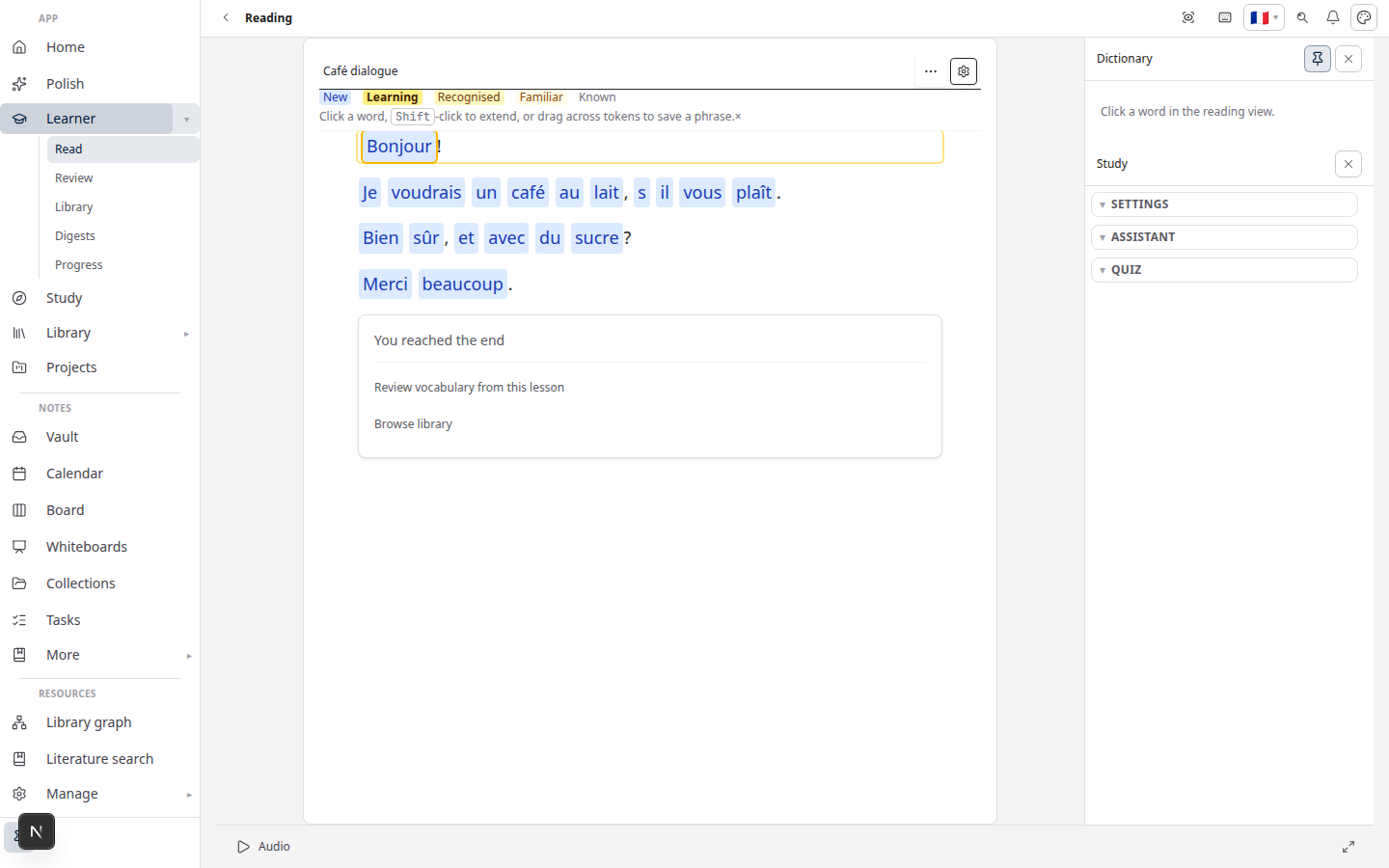
Lattuce Learner — read with word help and vocabulary review

Who this is for

YouGoal
Malaysian student or researcherRead Berita or rencana without losing every new word
Bilingual householdParents write in English; someone in the house is learning Malay
Independent learnerDaily news instead of a textbook chapter

Use texts you are allowed to read. Lingo pulls the article for study — it does not replace the publisher’s site or a news subscription.

Before you start

You needNotes
Lingo accesslingo.lattuce.app or Learn on lattuce.app
A Malay articleA public URL, or the text pasted from a page you can access
A few minutes after readingReview is where the words stick

Vocabulary tools unlock for a language you are learning. Malay news is the usual foreign-language path here. English leisure reading can open in read-only mode when English is already your native language.

Import the article

Pick one path. Both land in the same reader.

Path A — news URL

  1. Open Learn → Import → URL.
  2. Paste the article link.
  3. Confirm Malay as the language when asked.
  4. Open the lesson when import finishes.

Lingo keeps the readable text. Use this for ordinary web articles, not for a whole book file — books still go through file upload (import guide).

Path B — paste

  1. Open Learn → Import → Paste text.
  2. Paste a passage you copied from a page you can access.
  3. Set the language to Malay.
  4. Open the new lesson.

Paste is the right move for a clipped paragraph, a newsletter excerpt, or a page that does not import cleanly from the URL.

Tap vocabulary while you read

  1. Open the lesson in Read.
  2. Tap or click a word you do not know.
  3. Save it to Vocabulary. On the keyboard, 1 / 2 / 3 set Strand, Link, or Lattice.
You want…Mark it
First encounterStrand
Almost known — needs another contextLink
You read it without stoppingLattice

That three-tier map is the same model as Strands, Links, and Lattice. Honest labels beat a long list of “known” words you still trip over in the next headline.

Optional Auto-save links (reading preferences) turns a lookup into a Link so you can keep scrolling.

Review after the article

Saving a word is not the end of the session.

  1. Open Review from the Learn menu when cards are due.
  2. Recall the meaning, or fill the blank if the card is a cloze.
  3. Mark the card honestly. The next date follows your answer.

A short news piece is a good daily unit: one article, a handful of taps, then Review the next morning. For how spacing works, see spaced repetition in Learner.

A simple Malay-news habit

  1. Import today’s article (URL or paste).
  2. Read once for sense; tap only the words that blocked you.
  3. Review due cards — including words from yesterday’s piece.
  4. Optional: send a Writer paragraph to Learn later (Writer to Learner) if the news ties to a paper you are drafting.

Learner holds your word list. Collaborative manuscript translation stays in Writer’s translation tools — they sit next to each other, they do not replace each other.

Related reading

  • Learn Malay and English by reading
  • How to import articles and books
  • Strands, Links, and Lattice
  • Getting started with Lingo

Subscribe: RSS — Language learning series

Bahasa Melayu: Baca berita dalam bahasa Melayu dengan Lattuce Lingo

PreviousRemNote and Anki vs Lattuce Learner — flashcards or reading-first language learning?NextFamily shared vocabulary on one Lattuce household

Language learning

  1. 1. Learn languages by reading — getting started with Lingo by Lattuce
  2. 2. LingQ vs Lattuce Learner — which reading app fits your household?
  3. 3. Duolingo vs Lattuce Learner — daily lessons or real reading?
  4. 4. How to import articles and books into Lattuce Learner
  5. 5. Spaced repetition in Lattuce Learner — remember the words you save
  6. 6. From Writer to Learner — study foreign sources while you write
  7. 7. Lingo on lattuce.app — Learner beside Writer
  8. 8. Learn Malay and English by reading — bilingual households on Lattuce
  9. 9. Strands, Links, and Lattice — how Lattuce tracks the words you learn
  10. 10. Learn from YouTube captions with Lattuce Learner
  11. 11. Readlang vs Lattuce Learner — extension reader or household Lingo?
  12. 12. Community library in Lattuce Learner — share and browse lessons
  13. 13. RemNote and Anki vs Lattuce Learner — flashcards or reading-first language learning?
  14. You are here14. Read the news in Malay with Lattuce Lingo
  15. 15. Family shared vocabulary on one Lattuce household

On this page

  1. Who this is for
  2. Before you start
  3. Import the article
  4. Path A — news URL
  5. Path B — paste
  6. Tap vocabulary while you read
  7. Review after the article
  8. A simple Malay-news habit
  9. Related reading

Explore Lattuce

Try language learning on lingo.lattuce.app or read the workflow guides.

Try LattuceTutorialsPlansLearner

Subscribe to Language learning: RSS · Atom

← All posts
TermsPrivacyCookiesRefundsFAQContact[email protected]

© Lattuce

Skip to content
Blog
  1. Blog
  2. /
  3. Language learning
  4. /
  5. Read the news in Malay with Lattuce Lingo

May 19, 2027 · Language learning

Read the news in Malay with Lattuce Lingo

Import Malay news into Lattuce Lingo, tap vocabulary while you read, and review words on lingo.lattuce.app.

  • guide
  • learner
  • lingo
  • malay
  • news
  • language-learning
  • seo
LanguageEnglishBahasa Melayu

A Malay news article is already a lesson — if you can get it into a reader that remembers the words. Lattuce Lingo (lingo.lattuce.app) turns a URL or a pasted passage into study text: you read, tap vocabulary, and open Review when cards come due.

This is Learner, not exam prep from course PDFs. For that split, see Study vs Learner. For bilingual households that write in English and read Malay sources, start with bilingual reading.

Lattuce Learner — read with word help and vocabulary review

Who this is for

YouGoal
Malaysian student or researcherRead Berita or rencana without losing every new word
Bilingual householdParents write in English; someone in the house is learning Malay
Independent learnerDaily news instead of a textbook chapter

Use texts you are allowed to read. Lingo pulls the article for study — it does not replace the publisher’s site or a news subscription.

Before you start

You needNotes
Lingo accesslingo.lattuce.app or Learn on lattuce.app
A Malay articleA public URL, or the text pasted from a page you can access
A few minutes after readingReview is where the words stick

Vocabulary tools unlock for a language you are learning. Malay news is the usual foreign-language path here. English leisure reading can open in read-only mode when English is already your native language.

Import the article

Pick one path. Both land in the same reader.

Path A — news URL

  1. Open Learn → Import → URL.
  2. Paste the article link.
  3. Confirm Malay as the language when asked.
  4. Open the lesson when import finishes.

Lingo keeps the readable text. Use this for ordinary web articles, not for a whole book file — books still go through file upload (import guide).

Path B — paste

  1. Open Learn → Import → Paste text.
  2. Paste a passage you copied from a page you can access.
  3. Set the language to Malay.
  4. Open the new lesson.

Paste is the right move for a clipped paragraph, a newsletter excerpt, or a page that does not import cleanly from the URL.

Tap vocabulary while you read

  1. Open the lesson in Read.
  2. Tap or click a word you do not know.
  3. Save it to Vocabulary. On the keyboard, 1 / 2 / 3 set Strand, Link, or Lattice.
You want…Mark it
First encounterStrand
Almost known — needs another contextLink
You read it without stoppingLattice

That three-tier map is the same model as Strands, Links, and Lattice. Honest labels beat a long list of “known” words you still trip over in the next headline.

Optional Auto-save links (reading preferences) turns a lookup into a Link so you can keep scrolling.

Review after the article

Saving a word is not the end of the session.

  1. Open Review from the Learn menu when cards are due.
  2. Recall the meaning, or fill the blank if the card is a cloze.
  3. Mark the card honestly. The next date follows your answer.

A short news piece is a good daily unit: one article, a handful of taps, then Review the next morning. For how spacing works, see spaced repetition in Learner.

A simple Malay-news habit

  1. Import today’s article (URL or paste).
  2. Read once for sense; tap only the words that blocked you.
  3. Review due cards — including words from yesterday’s piece.
  4. Optional: send a Writer paragraph to Learn later (Writer to Learner) if the news ties to a paper you are drafting.

Learner holds your word list. Collaborative manuscript translation stays in Writer’s translation tools — they sit next to each other, they do not replace each other.

Related reading

  • Learn Malay and English by reading
  • How to import articles and books
  • Strands, Links, and Lattice
  • Getting started with Lingo

Subscribe: RSS — Language learning series

Bahasa Melayu: Baca berita dalam bahasa Melayu dengan Lattuce Lingo

PreviousRemNote and Anki vs Lattuce Learner — flashcards or reading-first language learning?NextFamily shared vocabulary on one Lattuce household

Language learning

  1. 1. Learn languages by reading — getting started with Lingo by Lattuce
  2. 2. LingQ vs Lattuce Learner — which reading app fits your household?
  3. 3. Duolingo vs Lattuce Learner — daily lessons or real reading?
  4. 4. How to import articles and books into Lattuce Learner
  5. 5. Spaced repetition in Lattuce Learner — remember the words you save
  6. 6. From Writer to Learner — study foreign sources while you write
  7. 7. Lingo on lattuce.app — Learner beside Writer
  8. 8. Learn Malay and English by reading — bilingual households on Lattuce
  9. 9. Strands, Links, and Lattice — how Lattuce tracks the words you learn
  10. 10. Learn from YouTube captions with Lattuce Learner
  11. 11. Readlang vs Lattuce Learner — extension reader or household Lingo?
  12. 12. Community library in Lattuce Learner — share and browse lessons
  13. 13. RemNote and Anki vs Lattuce Learner — flashcards or reading-first language learning?
  14. You are here14. Read the news in Malay with Lattuce Lingo
  15. 15. Family shared vocabulary on one Lattuce household

On this page

  1. Who this is for
  2. Before you start
  3. Import the article
  4. Path A — news URL
  5. Path B — paste
  6. Tap vocabulary while you read
  7. Review after the article
  8. A simple Malay-news habit
  9. Related reading

Explore Lattuce

Try language learning on lingo.lattuce.app or read the workflow guides.

Try LattuceTutorialsPlansLearner

Subscribe to Language learning: RSS · Atom

← All posts
TermsPrivacyCookiesRefundsFAQContact[email protected]

© Lattuce