Loading home
Loading home
Skip to content
Blog
  1. Blog
  2. /
  3. Translation
  4. /
  5. Approve EN section → MS abstract workflow in Lattuce

June 26, 2027 · Translation

Approve EN section → MS abstract workflow in Lattuce

Approve an English section, then produce the Malay abstract — author and translator hot path in Lattuce.

  • translation
  • weblate
  • abstract
  • journal
  • seo
LanguageEnglishBahasa Melayu

Journals and faculties often want the English section locked before anyone writes the Malay abstrak. In Lattuce the hot path is short: author approves the EN abstract in Writer, syncs segments, translator drafts MS, author reviews the target column, then you export.

EN↔MS is the documented example in this guide. The same approve-then-sync loop works for other locale pairs your household configures.

Platform primer: Collaborative translation on Lattuce. Journal-length checks (word count, keywords, names) live in Bilingual journal abstracts.
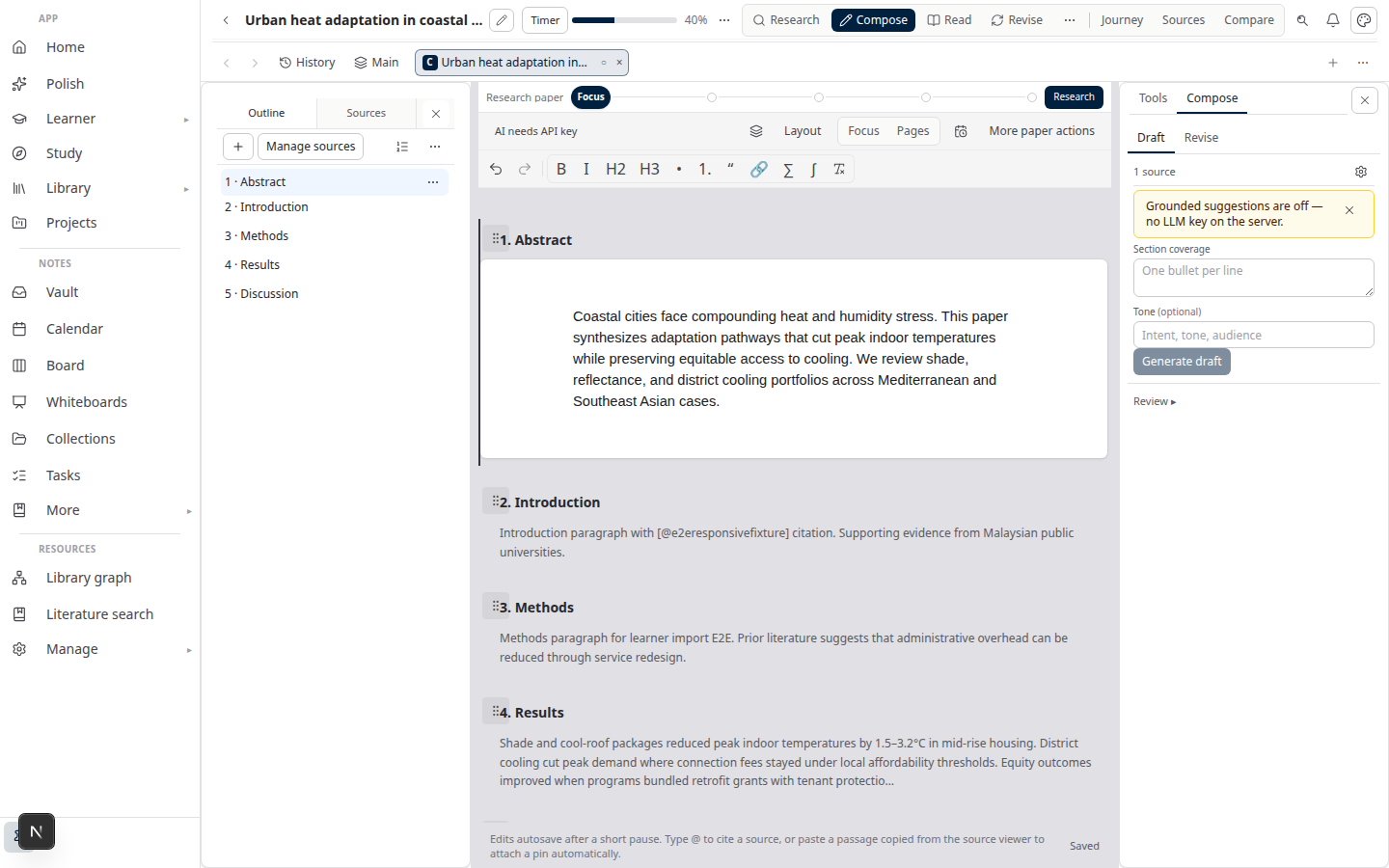
Lattuce Writer — collaborative translation on multilingual papers

Audience split

RoleToolDay-to-day job
Author / corresponding authorWriter + Translate modeFinish and approve the EN abstract; sync; review MS
Translator / bilingual co-authorTranslation editorFill MS segments; use TM and suggestions; mark reviewed
PI or supervisorReview in WriterSign off register and lab terms before submit

Translators do not need the full Writer compose UI. Authors do not type the abstrak into a side document that then drifts from the paper.

There is no separate “translator app” inside Writer — translators use the editor; authors sync from Translate mode.

Workflow overview

Hot path (every abstract, once accounts are linked):

  1. Author drafts the English abstract as its own section in Writer.
  2. Author approves that EN section — same section gate as the rest of the paper.
  3. Author opens Translate mode and syncs abstract paragraphs as segments to the MS project.
  4. Translator produces Malay in the editor (TM + glossary assist; human owns the string).
  5. Author compares EN source vs MS target in Translate mode and approves the imported abstract.
  6. Export the bilingual block to Word or paste into the publisher portal.

Cold path (first paper only): each person links a personal translation account in settings — not a shared password. Details: Collaborative translation on Lattuce.

Why approve English first

If you skip the EN gate…What goes wrong
Sync a still-moving draftTranslator redoes sentences after every author edit
Translate from a stale Word pasteAbstrak and paper abstract diverge
Let AI fill MS with no reviewRegister and lab terms slip

Approval on the EN section is the handoff. After that, sync is cheap; re-sync only when peer review changes the English.

EN↔MS as example pair

Malaysian submissions often look like this:

PartLocaleWho locks it
AbstractEnglishAuthor, in Writer
AbstrakMalay (ms)Translator, then author review
KeywordsBoth, per journal rulesAuthor after MS review

Keep numbers and proper nouns stable across columns unless the journal asks otherwise. Narrative sentences are what you translate.

Other pairs (EN↔AR, EN↔ZH) use the same section-approve → sync → review loop. Change the target locale on the translation project; do not change the roles.

Hot path — author

  1. Open the paper in Writer. Isolate the Abstract heading (add Abstrak in the template if your faculty uses both).
  2. Finish the English. Run the same section approve you use for body chapters.
  3. Translate mode → choose target ms → Sync only the abstract segments if the rest of the chapter is not ready.
  4. Wait for the translator. When segments return, read the MS column beside EN.
  5. Flag awkward academic Malay; send those segments back rather than silently rewriting in a local file.
  6. Approve the imported abstract section, then export.

If the EN abstract changes after review, re-sync. Translation memory highlights what must move again.

Hot path — translator

  1. Open the assigned project in the translation editor (the link or project your lead shared).
  2. Translate each abstract segment. Accept TM or AI suggestions only after you read them.
  3. Honour glossary locks for method names, drug names, and institution names.
  4. Mark segments reviewed. Do not wait for a perfect literary rewrite — abstracts are short enough to fix in a second pass with the author.

Day-to-day translation does not require opening Writer.

After both sides approve

CheckOwner
Journal word limit per languageAuthor
Keywords match author guidelinesAuthor
Terms match a thesis abstrak you already publishedAuthor + translator
Export or portal pasteAuthor

For a full chapter (not only the abstract), use Translate a thesis chapter. For lab-wide TM and locales, see Multilingual research lab.

AI suggestions are drafts. The approved EN section and the approved MS abstract are what you submit.

Related reading

  • Bilingual journal abstracts
  • Translate a thesis chapter
  • Collaborative translation on Lattuce

Subscribe: RSS — Translation series

Bahasa Melayu: Luluskan seksyen EN → aliran abstrak MS dalam Lattuce

PreviousMultilingual research lab on one Lattuce householdNextGlossary lock for lab terminology in collaborative translation

Translation

  1. 1. Collaborative translation on Lattuce
  2. 2. Translate a thesis chapter EN↔MS with collaborative translation in Lattuce
  3. 3. Bilingual journal abstracts with Lattuce and collaborative translation
  4. 4. Multilingual research lab on one Lattuce household
  5. You are here5. Approve EN section → MS abstract workflow in Lattuce
  6. 6. Glossary lock for lab terminology in collaborative translation

On this page

  1. Audience split
  2. Workflow overview
  3. Why approve English first
  4. EN↔MS as example pair
  5. Hot path — author
  6. Hot path — translator
  7. After both sides approve
  8. Related reading

Explore Lattuce

Start writing, compare tools, or browse tutorials for your research stack.

Try LattuceTutorialsPlans

Subscribe to Translation: RSS · Atom

← All posts
TermsPrivacyCookiesRefundsFAQContact[email protected]

© Lattuce

Skip to content
Blog
  1. Blog
  2. /
  3. Translation
  4. /
  5. Approve EN section → MS abstract workflow in Lattuce

June 26, 2027 · Translation

Approve EN section → MS abstract workflow in Lattuce

Approve an English section, then produce the Malay abstract — author and translator hot path in Lattuce.

  • translation
  • weblate
  • abstract
  • journal
  • seo
LanguageEnglishBahasa Melayu

Journals and faculties often want the English section locked before anyone writes the Malay abstrak. In Lattuce the hot path is short: author approves the EN abstract in Writer, syncs segments, translator drafts MS, author reviews the target column, then you export.

EN↔MS is the documented example in this guide. The same approve-then-sync loop works for other locale pairs your household configures.

Platform primer: Collaborative translation on Lattuce. Journal-length checks (word count, keywords, names) live in Bilingual journal abstracts.

Lattuce Writer — collaborative translation on multilingual papers

Audience split

RoleToolDay-to-day job
Author / corresponding authorWriter + Translate modeFinish and approve the EN abstract; sync; review MS
Translator / bilingual co-authorTranslation editorFill MS segments; use TM and suggestions; mark reviewed
PI or supervisorReview in WriterSign off register and lab terms before submit

Translators do not need the full Writer compose UI. Authors do not type the abstrak into a side document that then drifts from the paper.

There is no separate “translator app” inside Writer — translators use the editor; authors sync from Translate mode.

Workflow overview

Hot path (every abstract, once accounts are linked):

  1. Author drafts the English abstract as its own section in Writer.
  2. Author approves that EN section — same section gate as the rest of the paper.
  3. Author opens Translate mode and syncs abstract paragraphs as segments to the MS project.
  4. Translator produces Malay in the editor (TM + glossary assist; human owns the string).
  5. Author compares EN source vs MS target in Translate mode and approves the imported abstract.
  6. Export the bilingual block to Word or paste into the publisher portal.

Cold path (first paper only): each person links a personal translation account in settings — not a shared password. Details: Collaborative translation on Lattuce.

Why approve English first

If you skip the EN gate…What goes wrong
Sync a still-moving draftTranslator redoes sentences after every author edit
Translate from a stale Word pasteAbstrak and paper abstract diverge
Let AI fill MS with no reviewRegister and lab terms slip

Approval on the EN section is the handoff. After that, sync is cheap; re-sync only when peer review changes the English.

EN↔MS as example pair

Malaysian submissions often look like this:

PartLocaleWho locks it
AbstractEnglishAuthor, in Writer
AbstrakMalay (ms)Translator, then author review
KeywordsBoth, per journal rulesAuthor after MS review

Keep numbers and proper nouns stable across columns unless the journal asks otherwise. Narrative sentences are what you translate.

Other pairs (EN↔AR, EN↔ZH) use the same section-approve → sync → review loop. Change the target locale on the translation project; do not change the roles.

Hot path — author

  1. Open the paper in Writer. Isolate the Abstract heading (add Abstrak in the template if your faculty uses both).
  2. Finish the English. Run the same section approve you use for body chapters.
  3. Translate mode → choose target ms → Sync only the abstract segments if the rest of the chapter is not ready.
  4. Wait for the translator. When segments return, read the MS column beside EN.
  5. Flag awkward academic Malay; send those segments back rather than silently rewriting in a local file.
  6. Approve the imported abstract section, then export.

If the EN abstract changes after review, re-sync. Translation memory highlights what must move again.

Hot path — translator

  1. Open the assigned project in the translation editor (the link or project your lead shared).
  2. Translate each abstract segment. Accept TM or AI suggestions only after you read them.
  3. Honour glossary locks for method names, drug names, and institution names.
  4. Mark segments reviewed. Do not wait for a perfect literary rewrite — abstracts are short enough to fix in a second pass with the author.

Day-to-day translation does not require opening Writer.

After both sides approve

CheckOwner
Journal word limit per languageAuthor
Keywords match author guidelinesAuthor
Terms match a thesis abstrak you already publishedAuthor + translator
Export or portal pasteAuthor

For a full chapter (not only the abstract), use Translate a thesis chapter. For lab-wide TM and locales, see Multilingual research lab.

AI suggestions are drafts. The approved EN section and the approved MS abstract are what you submit.

Related reading

  • Bilingual journal abstracts
  • Translate a thesis chapter
  • Collaborative translation on Lattuce

Subscribe: RSS — Translation series

Bahasa Melayu: Luluskan seksyen EN → aliran abstrak MS dalam Lattuce

PreviousMultilingual research lab on one Lattuce householdNextGlossary lock for lab terminology in collaborative translation

Translation

  1. 1. Collaborative translation on Lattuce
  2. 2. Translate a thesis chapter EN↔MS with collaborative translation in Lattuce
  3. 3. Bilingual journal abstracts with Lattuce and collaborative translation
  4. 4. Multilingual research lab on one Lattuce household
  5. You are here5. Approve EN section → MS abstract workflow in Lattuce
  6. 6. Glossary lock for lab terminology in collaborative translation

On this page

  1. Audience split
  2. Workflow overview
  3. Why approve English first
  4. EN↔MS as example pair
  5. Hot path — author
  6. Hot path — translator
  7. After both sides approve
  8. Related reading

Explore Lattuce

Start writing, compare tools, or browse tutorials for your research stack.

Try LattuceTutorialsPlans

Subscribe to Translation: RSS · Atom

← All posts
TermsPrivacyCookiesRefundsFAQContact[email protected]

© Lattuce