Loading home
Loading home
Skip to content
Blog
  1. Blog
  2. /
  3. Translation
  4. /
  5. Glossary lock for lab terminology in collaborative translation

July 3, 2027 · Translation

Glossary lock for lab terminology in collaborative translation

Lock lab terms in Lattuce collaborative translation so translation memory stays consistent across papers.

  • translation
  • weblate
  • glossary
  • terminology
  • seo
LanguageEnglishBahasa Melayu

A lab that publishes in two languages fails in a boring way: three students, three Malay renderings of the same assay name. Glossary lock in Lattuce is the plain-language fix — you name the terms that must not drift, then translators and translation memory reuse that wording.

This is collaborative translation on lattuce.app, not a consumer phrasebook. EN↔MS is the example pair below; the same locks apply to other locales your household configures.
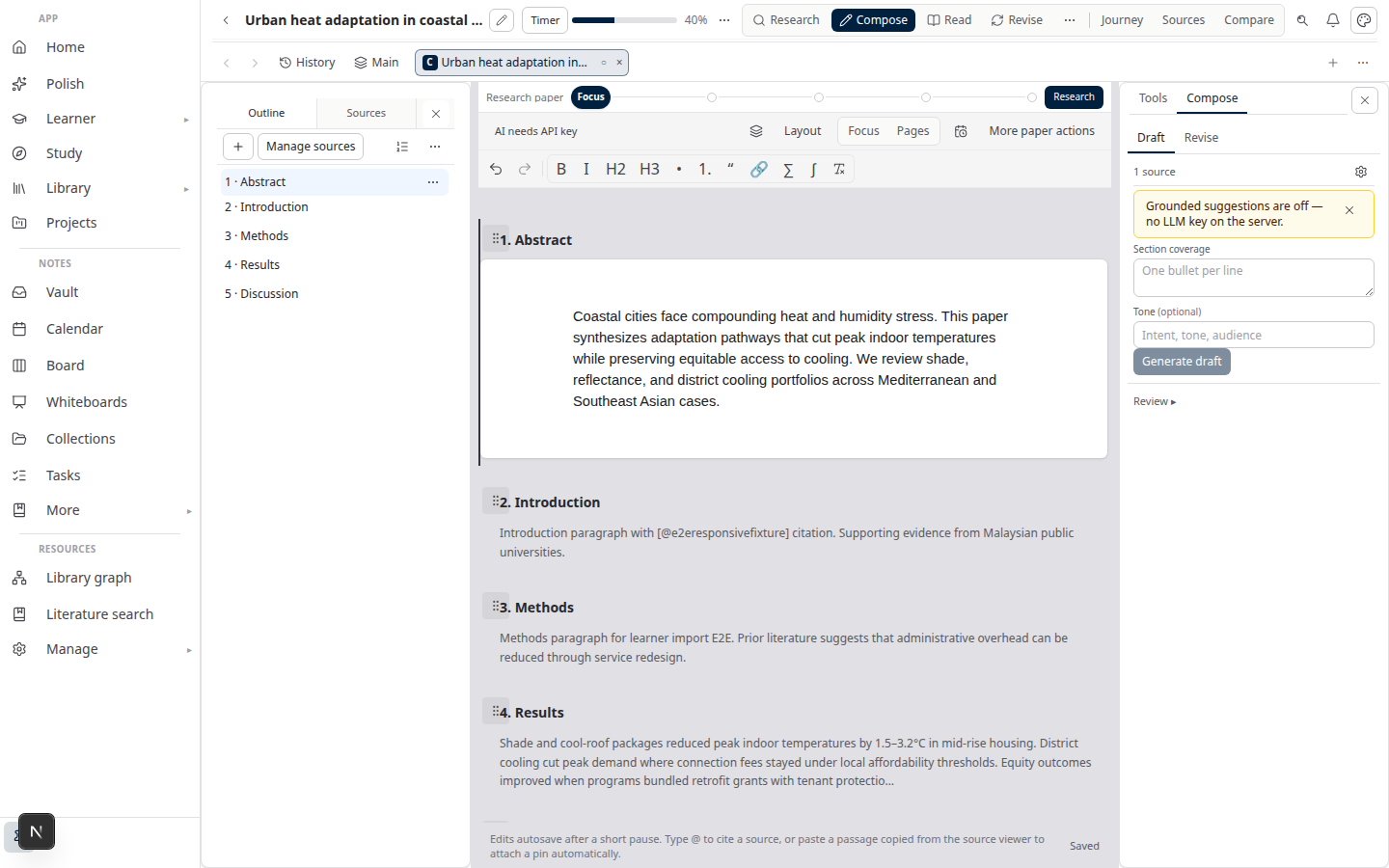
Lattuce Writer — collaborative translation on multilingual papers

Audience split

RoleJob with the glossary
PI or lab leadDecide which coinages, kit names, and institution strings are non-negotiable
AuthorAdd those entries before the first sync; keep EN source spelling stable
TranslatorUse the locked target string; do not invent a “nicer” synonym mid-paper
Household adminTranslation accounts are personal — no shared passwords

Authors work in Writer and Translate mode. Translators work in the translation editor. Day-to-day wording happens on segments; the glossary is the short list that sits above taste.

Two terms, one sentence each

TermMeaning here
Translation memory (TM)A store of already approved source–target pairs. The editor suggests them when a new sentence looks like an old one.
Locked glossary termA word or short phrase you marked must use this target. Suggestions still appear; the required term does not float.

You do not need the internals of the translation stack. If a suggestion disagrees with a lock, keep the lock.

Workflow overview

Hot path (every new paper after the lab list exists):

  1. Author finishes the English section and opens Translate mode.
  2. Confirm glossary entries for this paper (or reuse the lab list).
  3. Sync segments. Translator sees TM hits and locked terms.
  4. Translator fills remaining sentences; human approves each string.
  5. Author reviews the target column and exports Word.

Cold path (first lab paper): agree the term list in a meeting, then enter it once. Linking translation accounts is in Collaborative translation on Lattuce.

Lock terms before a crowd of students starts translating. Retrofitting a glossary after three inconsistent abstracts is possible — TM will still remember the old variants until you clean them.

What to lock (and what to leave)

LockLeave free
Assay, instrument, and kit brand namesOrdinary verbs and connectors
Statistical tests the lab always names the same wayLiterary synonyms in discussion prose
Institution, faculty, and ethics-board official namesAuthor voice in acknowledgements
Drug / compound names and gene symbolsNumbers that stay in the source language

If two PIs disagree on a Malay technical calque, decide once and lock it. The glossary is a policy, not a suggestion box.

EN↔MS as example pair

A Malaysian lab’s first ten locks often look like this:

English (source)Malay (locked target)Why
Faculty of … (official)The faculty’s published BM nameLetterhead and ethics forms already use it
Western blotThe lab’s chosen BM or retained EnglishMixing “blot Barat” and English in one thesis looks sloppy
Institutional nameOfficial BM / EN pairAbstracts and title pages must match

Configure target locale ms on the project. Other pairs use the same table — change the target column, not the discipline.

For the approve-then-sync abstract loop, see Approve EN section → MS abstract. For a full chapter, see Translate a thesis chapter.

How authors add locks

  1. Open the paper in Writer → Translate mode.
  2. Add glossary entries for each non-negotiable pair (source term → required target).
  3. Sync sections only after the list is in — headings and paragraphs become segments that can hit those terms.
  4. If peer review renames a method in English, update the EN source and the glossary row, then re-sync.

Do not paste a fifty-page style guide into a segment. Locks are short, repeatable strings.

How translators honour locks

  1. Open the assigned project in the translation editor.
  2. When a segment contains a locked term, use the required target. TM may also offer a full prior sentence — read it; keep the lock if the old sentence used a rejected synonym.
  3. Flag a lock that is wrong for this journal (some titles want English method names in the abstrak). The author updates the glossary; you do not silently override it.

AI machinery can propose a fluent sentence that still misses the locked term. Treat that as a draft.

Shared TM at household scale

Locks plus TM are how a lab household stays consistent across the second and third paper:

BenefitHow
Same “materials and methods” phrasingTM suggests last year’s approved segments
Coinages do not drift between studentsGlossary lock sits on the term
Faster abstract on paper twoPattern reuse — still human-reviewed

Memory stays on translation projects your household owns — not a global consumer pool. Household scope and locale pairs: Multilingual research lab.

Lattuce does not market “automatic perfect translation.” Humans approve segments; TM and locks assist.

Related reading

  • Collaborative translation on Lattuce
  • Multilingual research lab
  • Translate a thesis chapter
  • Bilingual journal abstracts

Subscribe: RSS — Translation series

Bahasa Melayu: Kunci glosari untuk istilah makmal dalam terjemahan kolaboratif

PreviousApprove EN section → MS abstract workflow in Lattuce

Translation

  1. 1. Collaborative translation on Lattuce
  2. 2. Translate a thesis chapter EN↔MS with collaborative translation in Lattuce
  3. 3. Bilingual journal abstracts with Lattuce and collaborative translation
  4. 4. Multilingual research lab on one Lattuce household
  5. 5. Approve EN section → MS abstract workflow in Lattuce
  6. You are here6. Glossary lock for lab terminology in collaborative translation

On this page

  1. Audience split
  2. Two terms, one sentence each
  3. Workflow overview
  4. What to lock (and what to leave)
  5. EN↔MS as example pair
  6. How authors add locks
  7. How translators honour locks
  8. Shared TM at household scale
  9. Related reading

Explore Lattuce

Start writing, compare tools, or browse tutorials for your research stack.

Try LattuceTutorialsPlans

Subscribe to Translation: RSS · Atom

← All posts
TermsPrivacyCookiesRefundsFAQContact[email protected]

© Lattuce

Skip to content
Blog
  1. Blog
  2. /
  3. Translation
  4. /
  5. Glossary lock for lab terminology in collaborative translation

July 3, 2027 · Translation

Glossary lock for lab terminology in collaborative translation

Lock lab terms in Lattuce collaborative translation so translation memory stays consistent across papers.

  • translation
  • weblate
  • glossary
  • terminology
  • seo
LanguageEnglishBahasa Melayu

A lab that publishes in two languages fails in a boring way: three students, three Malay renderings of the same assay name. Glossary lock in Lattuce is the plain-language fix — you name the terms that must not drift, then translators and translation memory reuse that wording.

This is collaborative translation on lattuce.app, not a consumer phrasebook. EN↔MS is the example pair below; the same locks apply to other locales your household configures.

Lattuce Writer — collaborative translation on multilingual papers

Audience split

RoleJob with the glossary
PI or lab leadDecide which coinages, kit names, and institution strings are non-negotiable
AuthorAdd those entries before the first sync; keep EN source spelling stable
TranslatorUse the locked target string; do not invent a “nicer” synonym mid-paper
Household adminTranslation accounts are personal — no shared passwords

Authors work in Writer and Translate mode. Translators work in the translation editor. Day-to-day wording happens on segments; the glossary is the short list that sits above taste.

Two terms, one sentence each

TermMeaning here
Translation memory (TM)A store of already approved source–target pairs. The editor suggests them when a new sentence looks like an old one.
Locked glossary termA word or short phrase you marked must use this target. Suggestions still appear; the required term does not float.

You do not need the internals of the translation stack. If a suggestion disagrees with a lock, keep the lock.

Workflow overview

Hot path (every new paper after the lab list exists):

  1. Author finishes the English section and opens Translate mode.
  2. Confirm glossary entries for this paper (or reuse the lab list).
  3. Sync segments. Translator sees TM hits and locked terms.
  4. Translator fills remaining sentences; human approves each string.
  5. Author reviews the target column and exports Word.

Cold path (first lab paper): agree the term list in a meeting, then enter it once. Linking translation accounts is in Collaborative translation on Lattuce.

Lock terms before a crowd of students starts translating. Retrofitting a glossary after three inconsistent abstracts is possible — TM will still remember the old variants until you clean them.

What to lock (and what to leave)

LockLeave free
Assay, instrument, and kit brand namesOrdinary verbs and connectors
Statistical tests the lab always names the same wayLiterary synonyms in discussion prose
Institution, faculty, and ethics-board official namesAuthor voice in acknowledgements
Drug / compound names and gene symbolsNumbers that stay in the source language

If two PIs disagree on a Malay technical calque, decide once and lock it. The glossary is a policy, not a suggestion box.

EN↔MS as example pair

A Malaysian lab’s first ten locks often look like this:

English (source)Malay (locked target)Why
Faculty of … (official)The faculty’s published BM nameLetterhead and ethics forms already use it
Western blotThe lab’s chosen BM or retained EnglishMixing “blot Barat” and English in one thesis looks sloppy
Institutional nameOfficial BM / EN pairAbstracts and title pages must match

Configure target locale ms on the project. Other pairs use the same table — change the target column, not the discipline.

For the approve-then-sync abstract loop, see Approve EN section → MS abstract. For a full chapter, see Translate a thesis chapter.

How authors add locks

  1. Open the paper in Writer → Translate mode.
  2. Add glossary entries for each non-negotiable pair (source term → required target).
  3. Sync sections only after the list is in — headings and paragraphs become segments that can hit those terms.
  4. If peer review renames a method in English, update the EN source and the glossary row, then re-sync.

Do not paste a fifty-page style guide into a segment. Locks are short, repeatable strings.

How translators honour locks

  1. Open the assigned project in the translation editor.
  2. When a segment contains a locked term, use the required target. TM may also offer a full prior sentence — read it; keep the lock if the old sentence used a rejected synonym.
  3. Flag a lock that is wrong for this journal (some titles want English method names in the abstrak). The author updates the glossary; you do not silently override it.

AI machinery can propose a fluent sentence that still misses the locked term. Treat that as a draft.

Shared TM at household scale

Locks plus TM are how a lab household stays consistent across the second and third paper:

BenefitHow
Same “materials and methods” phrasingTM suggests last year’s approved segments
Coinages do not drift between studentsGlossary lock sits on the term
Faster abstract on paper twoPattern reuse — still human-reviewed

Memory stays on translation projects your household owns — not a global consumer pool. Household scope and locale pairs: Multilingual research lab.

Lattuce does not market “automatic perfect translation.” Humans approve segments; TM and locks assist.

Related reading

  • Collaborative translation on Lattuce
  • Multilingual research lab
  • Translate a thesis chapter
  • Bilingual journal abstracts

Subscribe: RSS — Translation series

Bahasa Melayu: Kunci glosari untuk istilah makmal dalam terjemahan kolaboratif

PreviousApprove EN section → MS abstract workflow in Lattuce

Translation

  1. 1. Collaborative translation on Lattuce
  2. 2. Translate a thesis chapter EN↔MS with collaborative translation in Lattuce
  3. 3. Bilingual journal abstracts with Lattuce and collaborative translation
  4. 4. Multilingual research lab on one Lattuce household
  5. 5. Approve EN section → MS abstract workflow in Lattuce
  6. You are here6. Glossary lock for lab terminology in collaborative translation

On this page

  1. Audience split
  2. Two terms, one sentence each
  3. Workflow overview
  4. What to lock (and what to leave)
  5. EN↔MS as example pair
  6. How authors add locks
  7. How translators honour locks
  8. Shared TM at household scale
  9. Related reading

Explore Lattuce

Start writing, compare tools, or browse tutorials for your research stack.

Try LattuceTutorialsPlans

Subscribe to Translation: RSS · Atom

← All posts
TermsPrivacyCookiesRefundsFAQContact[email protected]

© Lattuce