Loading home
Loading home
Skip to content
Blog
Lattuce apps

Choose another workspace. Writer, Library, Projects, and Calendar stay on lattuce.app.

WWriterWrite papers and manage sourcesCurrentNNotaCapture and organize your notes↗LLingoRead and study languages↗QQuranRead, listen, and cite↗KKelasLearn and teach together↗BBacaRead and organize your books↗EEnnakExplore recipes and meal ideas↗SSepedaBicycle catalog and research↗SSukanAnalyze rides and routes↗
  1. Blog
  2. /
  3. Tool comparisons
  4. /
  5. Notion과 Lattuce 함께 사용하기

2026년 8월 8일 · Tool comparisons

Notion과 Lattuce 함께 사용하기

팀 위키에는 Notion을, 논문·PDF·인용·글쓰기에는 Lattuce를 사용하는 경우를 살펴봅니다.

  • comparison
  • notion
  • complement
  • team
  • seo
  • ko
언어DeutschEnglishEspañolFrançais日本語한국어Bahasa MelayuPolski简体中文

앱 내 도움말은 제품 어시스턴트에게 Notion과 Lattuce 함께 사용하기에 관해 물어보세요.

Notion은 공유 페이지, 데이터베이스, 워크스페이스 전반의 AI 등 팀을 위한 도구입니다. Lattuce는 PDF, 인용, 논문, 번역, 글쓰기 등 연구를 위한 도구입니다. lattuce.app에서 확인해 보세요.
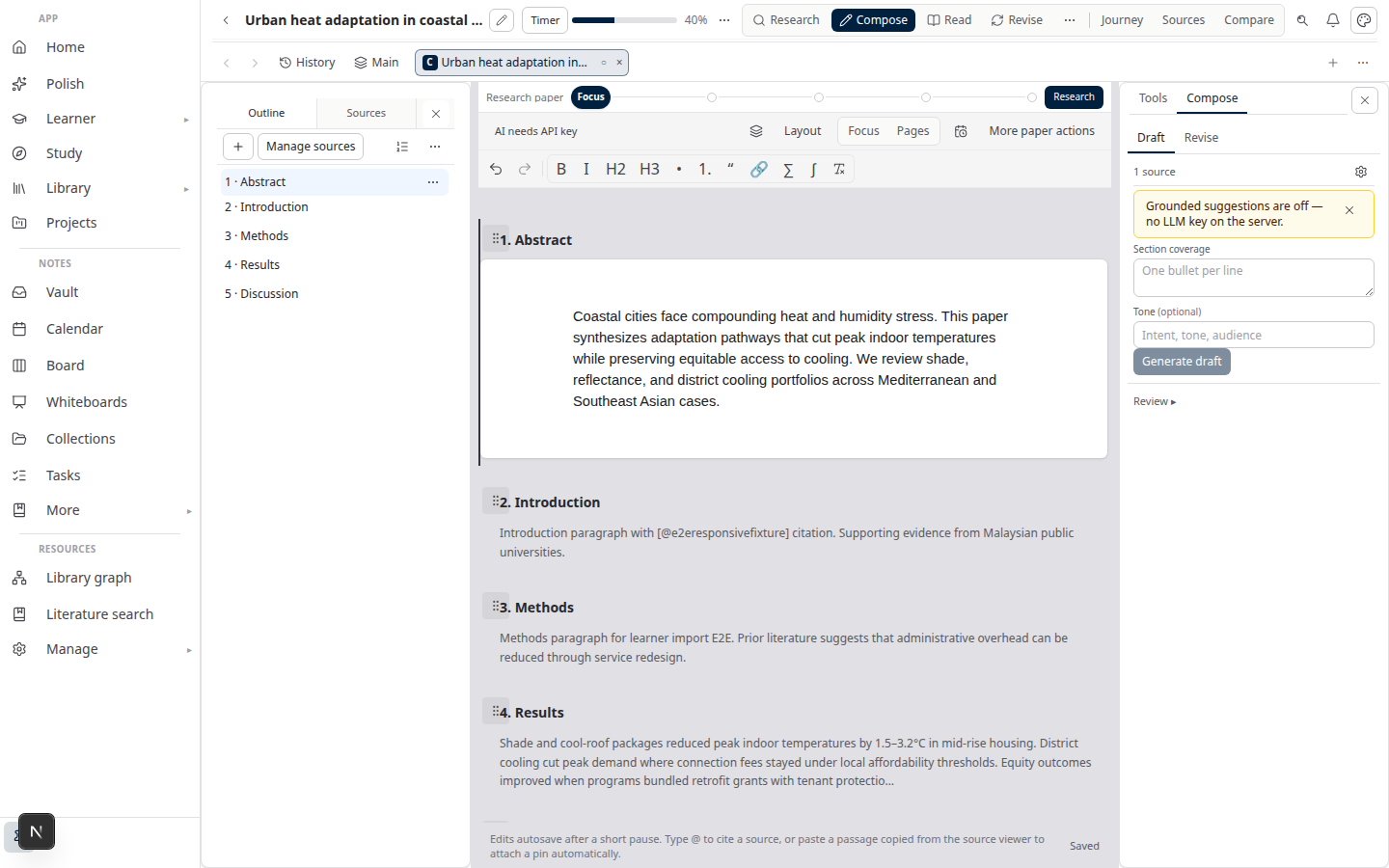
Lattuce Writer — Notion 위키 옆의 논문과 인용

두 도구를 함께 쓰는 경우

필요한 작업사용할 도구
연구실 운영 지침, 회의 메모, 일반 프로젝트 관리Notion
논문, PDF 라이브러리, 인용을 포함한 글쓰기, 번역Lattuce
가정에서의 조사와 글쓰기Lattuce (일상 계획에는 Notion을 함께 사용 가능)

연구 중심 팀을 위해 Lattuce가 더하는 기능

  • 노트, 자료, 논문을 함께 살펴보며 질문할 수 있습니다(선택 사항: 개인 AI 키 사용).
  • 표, 보드, 캘린더 등으로 볼 수 있는 라이브러리 컬렉션.
  • 노트와 화이트보드 공동 편집 — 계획 중입니다. 논문의 모든 섹션을 공동 편집할 수 있다는 뜻은 아닙니다.

Notion이 여전히 강한 부분

  • 모든 블록의 실시간 편집
  • 데이터베이스 간 수식과 자동화
  • 방대한 템플릿 및 연동 기능 모음
  • 개인 사용자의 간편한 가입

실용적인 역할 분담

  1. 팀 운영 지침과 연구 외 계획에는 Notion을 계속 사용합니다.
  2. 자료, 학습, Word 내보내기에는 lattuce.app의 Lattuce를 사용합니다.
  3. Notion 페이지에서 Lattuce 논문과 공유 노트로 연결합니다.

AI 비용

Notion Business (~$20/user/mo)에는 팀용 AI가 포함됩니다. Lattuce에서는 원하는 제공업체를 선택할 수 있도록 설정에서 자신의 AI 키를 사용할 수 있습니다.

기능 표는 Notion과 Lattuce 비교를 참고하세요. NotebookLM, Obsidian, Heptabase 등은 연구 앱과 Lattuce 비교에서 확인할 수 있습니다.

정리

Notion은 팀의 중심 공간으로 계속 사용하고, Lattuce는 논문, PDF, 인용, 내보내기를 맡기세요. 두 도구를 연결해 각 도구가 잘하는 일을 하도록 하면 됩니다.

Bahasa Melayu: Menggunakan Lattuce bersama Notion (MS).

PreviousNotion vs Lattuce — 어떤 연구 도구가 내 작업 흐름에 맞을까?NextLattuce와 연구·팀 앱 비교

Tool comparisons

  1. 1. Notion vs Lattuce — 어떤 연구 도구가 내 작업 흐름에 맞을까?
  2. You are here2. Notion과 Lattuce 함께 사용하기
  3. 3. Lattuce와 연구·팀 앱 비교
  4. 4. Obsidian vs Lattuce — 노트 보관함인가, 완전한 연구 작업 공간인가?
  5. 5. NotebookLM vs Lattuce — 빠른 요약인가, 완전한 연구 워크플로인가?
  6. 6. Heptabase vs Lattuce — 시각적 사고인가, 인용이 포함된 학술 글쓰기인가?
  7. 7. Fabric 대 Lattuce — AI 세컨드 브레인인가, 인용이 포함된 학술 글쓰기인가?
  8. 8. Elicit vs Lattuce — 문헌 검색일까, 완전한 연구 파이프라인일까?

On this page

  1. 두 도구를 함께 쓰는 경우
  2. 연구 중심 팀을 위해 Lattuce가 더하는 기능
  3. Notion이 여전히 강한 부분
  4. 실용적인 역할 분담
  5. AI 비용
  6. 정리

Explore Lattuce

Start writing, compare tools, or browse tutorials for your research stack.

Try LattuceTutorialsPlans

Subscribe to Tool comparisons: RSS · Atom

← 모든 게시물
TermsPrivacyCookiesRefundsFAQContact[email protected]

© Lattuce

Skip to content
Blog
Lattuce apps

Choose another workspace. Writer, Library, Projects, and Calendar stay on lattuce.app.

WWriterWrite papers and manage sourcesCurrentNNotaCapture and organize your notes↗LLingoRead and study languages↗QQuranRead, listen, and cite↗KKelasLearn and teach together↗BBacaRead and organize your books↗EEnnakExplore recipes and meal ideas↗SSepedaBicycle catalog and research↗SSukanAnalyze rides and routes↗
  1. Blog
  2. /
  3. Tool comparisons
  4. /
  5. Notion과 Lattuce 함께 사용하기

2026년 8월 8일 · Tool comparisons

Notion과 Lattuce 함께 사용하기

팀 위키에는 Notion을, 논문·PDF·인용·글쓰기에는 Lattuce를 사용하는 경우를 살펴봅니다.

  • comparison
  • notion
  • complement
  • team
  • seo
  • ko
언어DeutschEnglishEspañolFrançais日本語한국어Bahasa MelayuPolski简体中文

앱 내 도움말은 제품 어시스턴트에게 Notion과 Lattuce 함께 사용하기에 관해 물어보세요.

Notion은 공유 페이지, 데이터베이스, 워크스페이스 전반의 AI 등 팀을 위한 도구입니다. Lattuce는 PDF, 인용, 논문, 번역, 글쓰기 등 연구를 위한 도구입니다. lattuce.app에서 확인해 보세요.

Lattuce Writer — Notion 위키 옆의 논문과 인용

두 도구를 함께 쓰는 경우

필요한 작업사용할 도구
연구실 운영 지침, 회의 메모, 일반 프로젝트 관리Notion
논문, PDF 라이브러리, 인용을 포함한 글쓰기, 번역Lattuce
가정에서의 조사와 글쓰기Lattuce (일상 계획에는 Notion을 함께 사용 가능)

연구 중심 팀을 위해 Lattuce가 더하는 기능

  • 노트, 자료, 논문을 함께 살펴보며 질문할 수 있습니다(선택 사항: 개인 AI 키 사용).
  • 표, 보드, 캘린더 등으로 볼 수 있는 라이브러리 컬렉션.
  • 노트와 화이트보드 공동 편집 — 계획 중입니다. 논문의 모든 섹션을 공동 편집할 수 있다는 뜻은 아닙니다.

Notion이 여전히 강한 부분

  • 모든 블록의 실시간 편집
  • 데이터베이스 간 수식과 자동화
  • 방대한 템플릿 및 연동 기능 모음
  • 개인 사용자의 간편한 가입

실용적인 역할 분담

  1. 팀 운영 지침과 연구 외 계획에는 Notion을 계속 사용합니다.
  2. 자료, 학습, Word 내보내기에는 lattuce.app의 Lattuce를 사용합니다.
  3. Notion 페이지에서 Lattuce 논문과 공유 노트로 연결합니다.

AI 비용

Notion Business (~$20/user/mo)에는 팀용 AI가 포함됩니다. Lattuce에서는 원하는 제공업체를 선택할 수 있도록 설정에서 자신의 AI 키를 사용할 수 있습니다.

기능 표는 Notion과 Lattuce 비교를 참고하세요. NotebookLM, Obsidian, Heptabase 등은 연구 앱과 Lattuce 비교에서 확인할 수 있습니다.

정리

Notion은 팀의 중심 공간으로 계속 사용하고, Lattuce는 논문, PDF, 인용, 내보내기를 맡기세요. 두 도구를 연결해 각 도구가 잘하는 일을 하도록 하면 됩니다.

Bahasa Melayu: Menggunakan Lattuce bersama Notion (MS).

PreviousNotion vs Lattuce — 어떤 연구 도구가 내 작업 흐름에 맞을까?NextLattuce와 연구·팀 앱 비교

Tool comparisons

  1. 1. Notion vs Lattuce — 어떤 연구 도구가 내 작업 흐름에 맞을까?
  2. You are here2. Notion과 Lattuce 함께 사용하기
  3. 3. Lattuce와 연구·팀 앱 비교
  4. 4. Obsidian vs Lattuce — 노트 보관함인가, 완전한 연구 작업 공간인가?
  5. 5. NotebookLM vs Lattuce — 빠른 요약인가, 완전한 연구 워크플로인가?
  6. 6. Heptabase vs Lattuce — 시각적 사고인가, 인용이 포함된 학술 글쓰기인가?
  7. 7. Fabric 대 Lattuce — AI 세컨드 브레인인가, 인용이 포함된 학술 글쓰기인가?
  8. 8. Elicit vs Lattuce — 문헌 검색일까, 완전한 연구 파이프라인일까?

On this page

  1. 두 도구를 함께 쓰는 경우
  2. 연구 중심 팀을 위해 Lattuce가 더하는 기능
  3. Notion이 여전히 강한 부분
  4. 실용적인 역할 분담
  5. AI 비용
  6. 정리

Explore Lattuce

Start writing, compare tools, or browse tutorials for your research stack.

Try LattuceTutorialsPlans

Subscribe to Tool comparisons: RSS · Atom

← 모든 게시물
TermsPrivacyCookiesRefundsFAQContact[email protected]

© Lattuce